
PE-File
What is PE ?
Portable Executable(PE) files are executable files that belong to the Windows operating system…
Why it is Important ?
We would like to use the resources that we can have as much information about the files examined in the fields of Reverse Engineering and Malware Analysis. In particular, PE Headers contain very critical information about executable files. Although it is simple, this structure, which allows threat actors to constantly manipulate and obfuscate with various techniques, should definitely not be neglected. At this point, knowing the PE-FILE structure is extremely essential for the analysis.
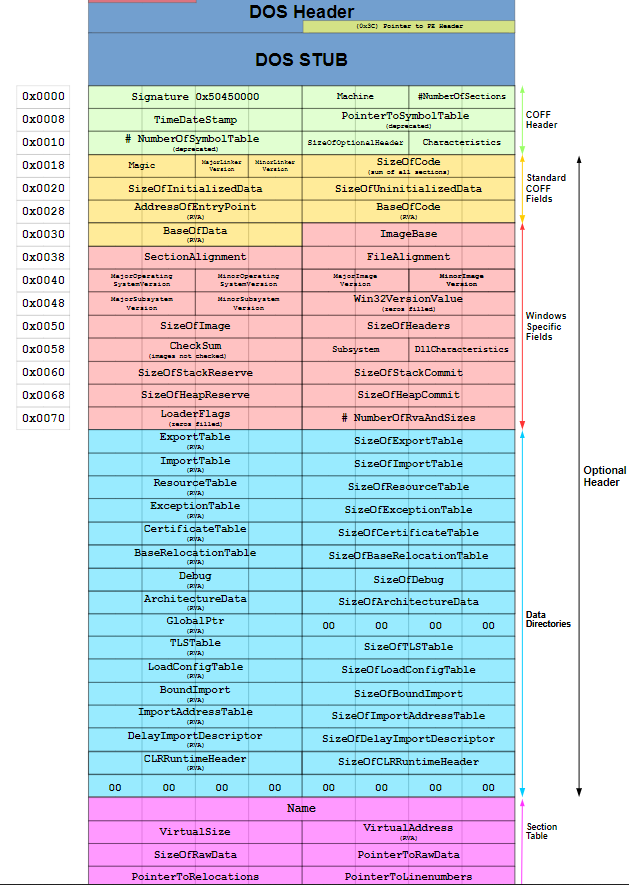
And our reference guide image provides us the PE Header, byte by byte.
Okay we saw it, now what do they mean?
Of course, we will not mention all of them from top to bottom, we will pick out the ones that may be important to us and go about our business.
Header Information
For those interested in programming, these values are kept in the “struct” in the “winnt.h” file.
typedef struct _IMAGE_FILE_HEADER {
    WORD    Machine;
    WORD    NumberOfSections;
    DWORD   TimeDateStamp;
    DWORD   PointerToSymbolTable;
    DWORD   NumberOfSymbols;
    WORD    SizeOfOptionalHeader;
    WORD    Characteristics;
} IMAGE_FILE_HEADER, *PIMAGE_FILE_HEADER;
Machine: Provides information about which machine type the file will run on.
TimeDateStamp: Specifies the time the file was compiled. It would not be right to make a clear judgment as it can be manipulated very easily.
Characteristics: It gives information about the attribute with the flag structure. MSDN (detailed info)
typedef struct _IMAGE_OPTIONAL_HEADER {
    //
    // Standard fields.
    //

    WORD    Magic;
    BYTE    MajorLinkerVersion;
    BYTE    MinorLinkerVersion;
    DWORD   SizeOfCode;
    DWORD   SizeOfInitializedData;
    DWORD   SizeOfUninitializedData;
    DWORD   AddressOfEntryPoint;
    DWORD   BaseOfCode;
    DWORD   BaseOfData;

    //
    // NT additional fields.
    //

    DWORD   ImageBase;
    DWORD   SectionAlignment;
    DWORD   FileAlignment;
    WORD    MajorOperatingSystemVersion;
    WORD    MinorOperatingSystemVersion;
    WORD    MajorImageVersion;
    WORD    MinorImageVersion;
    WORD    MajorSubsystemVersion;
    WORD    MinorSubsystemVersion;
    DWORD   Win32VersionValue;
    DWORD   SizeOfImage;
    DWORD   SizeOfHeaders;
    DWORD   CheckSum;
    WORD    Subsystem;
    WORD    DllCharacteristics;
    DWORD   SizeOfStackReserve;
    DWORD   SizeOfStackCommit;
    DWORD   SizeOfHeapReserve;
    DWORD   SizeOfHeapCommit;
    DWORD   LoaderFlags;
    DWORD   NumberOfRvaAndSizes;
    IMAGE_DATA_DIRECTORY DataDirectory[IMAGE_NUMBEROF_DIRECTORY_ENTRIES];
} IMAGE_OPTIONAL_HEADER32, *PIMAGE_OPTIONAL_HEADER32;
This is the area where we will be more engaged.
Magic: Specifies 0x10b(PE32) for 32bit, 0x20b(PE32+) for 64bit.
SizeOfCode: Specifies the size of the code in the .Text section.
SizeOfInitializedData: Specifies the size of the initialized data (for all data sections)
SizeOfUninitializedData: Contains the size of uninitialized data in the .BSS section.
AddressOfEntryPoint: The address (ImageBase) after it is loaded into physical memory and its sum takes us to the beginning of the code to be executed of the file (of course there are exceptions and obfuscations)
ImageBase: Indicates at which address it should be loaded into the physical memory, but that address is probably full and it will loaded by the system to another free place on the memory (0x00400000 by default)
SectionAlignment: Sections are not loaded with fractional values when loading into memory. Instead, it is rounded to multiples of the SectionAlignment value and it is loaded there.
Major/MinorOperatingSystemVersion: Specifies the minimum required operating system version. MSDN
SizeOfImage: Specifies the total space it will occupy in physical memory.
Subsystem: Specifies which interface the file will work with.MSDN
typedef struct _IMAGE_SECTION_HEADER {
    BYTE    Name[IMAGE_SIZEOF_SHORT_NAME];
    union {
            DWORD   PhysicalAddress;
            DWORD   VirtualSize;
    } Misc;
    DWORD   VirtualAddress;
    DWORD   SizeOfRawData;
    DWORD   PointerToRawData;
    DWORD   PointerToRelocations;
    DWORD   PointerToLinenumbers;
    WORD    NumberOfRelocations;
    WORD    NumberOfLinenumbers;
    DWORD   Characteristics;
} IMAGE_SECTION_HEADER, *PIMAGE_SECTION_HEADER;
VirtualSize: Indicates the actual size of the data.
VirtualAddress: Specifies the distance from where it is loaded into physical memory.
SizeOfRawData: Indicates VirtualSize rounded to FileAlignment multiples and the raw size of the relevant section in the file.
PointerToRawData: Specifies the raw address in the file belonging to the section. It can be found by summing the raw size and raw address of the previous section.
Let’s continue our topic here for the rest and detailed information you are curious about PE-Format_MSDN You can check the address
TLSCallback Example
This structure, which can be overlooked during dynamic analysis, is actually just waiting to be seen as presented to us in static analysis.
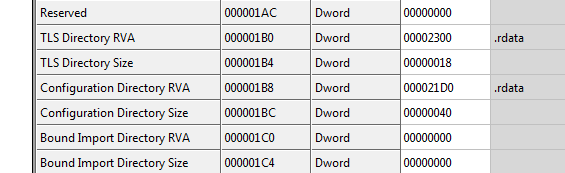
VA = 2000, Raw address = 1200 of the .rdata section. Based on this information, the address shown as 2300 is
We can find the values to be loaded on memory via a hex editor.
The .rdata section starts from 2000. TLSCALLBACK, which is 0x300 far from the .rdata section,
can be found at address 1500 in the hex editor by adding 0x300 to 0x1200 which is raw addres.
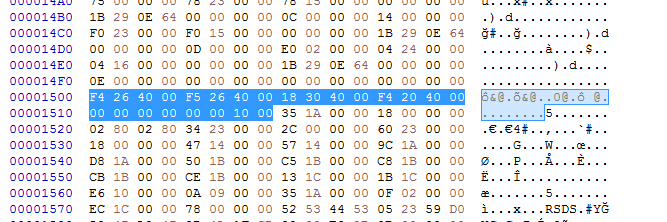
The fourth DWORD value of this directory with a size of 0x18 will take us to the address where the starting address of Tls is kept.
(Directory information is available in CFF Explorer)
The 4th DWORD value marked in the image is F4 20 40 00. This information is processed in reverse and byte by byte (Endianness). We will find the starting address at 004020F4. Of course, we cannot find it at this address because we need to extract the image base value and calculate the raw address. If we do the same thing we just did before, we will get the address 12F4(.rdata RAW = 1200+F4).
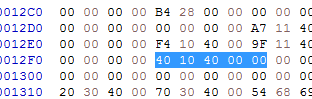
We see the address 00401040 which points to the beginning of the .text section we know from VA (0x40 away from .text)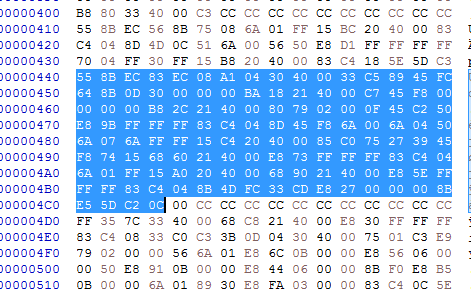
Since .text starts from 400 as Raw, address 440 will take us to the beginning of Tls.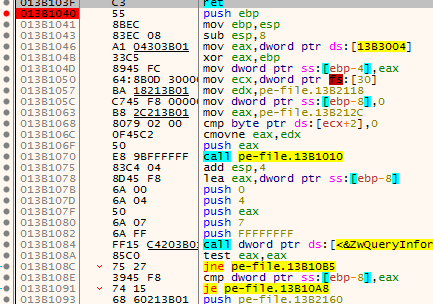
If you compare the opcodes here with the previous image, you can see that they match exactly.
With this analysis we made in statics, we were able to obtain preliminary information about the file that will be useful to us in the later stages of the analysis, and we also saw a little more closely how Windows handles executable files and how they run them. Of course, you can access the TLS structure via IDA and debugger without them.
~Heroes are made by the times.
