
Memory_Traversal
Memory Traversal
Did you ever notice some information just waiting at memory ?
Yeah there is but how can we reach there? How can we know we are at the right page? What if violation occurer? There is so many conflict…
Overview
First of all I want to show thats
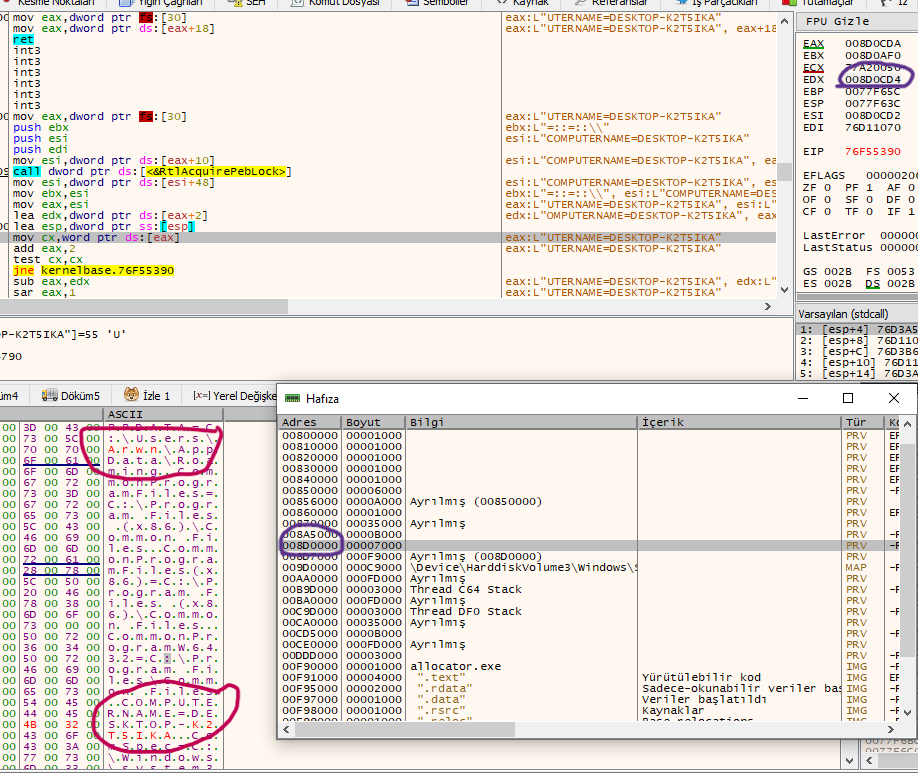
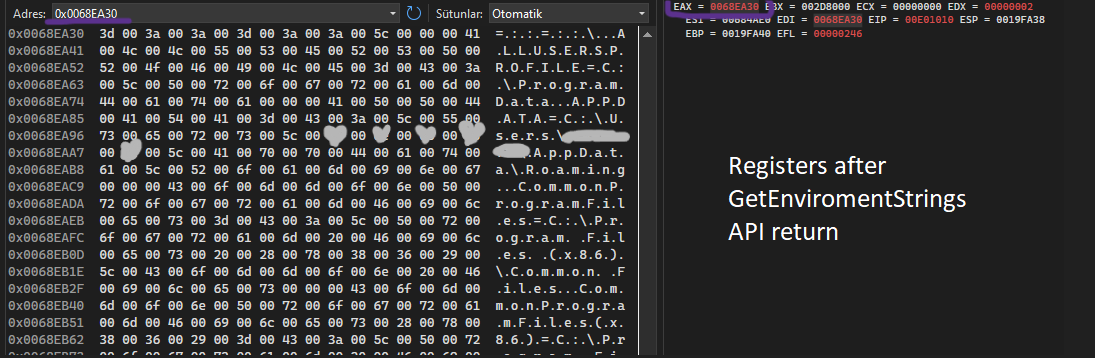
That chunk is include enviroment variables and you can get it by using “GetEnvironmentStrings” API.
You can check it with code below. Get eax/rax right after the return API then check it in memory.
    // get pointer
    LPWCH envStrings = GetEnvironmentStrings(); // add breakpoint here
    if (envStrings == nullptr) {
        std::cerr << "Failed to get environment strings." << std::endl;
        return 1;
    }

    // print variables
    LPWCH envVar = envStrings;
    while (*envVar) {
        // print every variable step by step
        std::wcout << envVar << std::endl;

        // get length and add to pointer for next variable
        envVar += wcslen(envVar) + 1;
    }

    FreeEnvironmentStrings(envStrings);
Purpose
We’re just having fun 🥱
If I use an API it will clearly seem by tools, product and sandbox etc. so I want to hide as much as possible. Why do I not ?:)
But how can I get that informations without using API?
I said I WON’T USE, it will be used, just not by my hand. Ntdll already doing it when initialize the process and it will put that informations to memory. Just after that moment Ntdll will free that memory because no more needed it’s job is done but all value is still waiting at memory. (add breakpoint to API and restart debugging you will see)
Here is the important part;
If I allocate a memory and if that memory allocated at same page with all of that informations it means I can leak it. Probably that freed memory waiting top of the freelist so when I allocate immediately I get that pointer.
Moreover, there are so many pages containing this information. If you allocate memory at any page, you may come across a page that stores it.
The problem is scanning memory. We can’t know where we are at allocation so we need to take a look. If we try to look out of bound then violation occurer.
Enough talking!!
Code it!
Msvc22-> Solution-> Settings-> C/C+±> Code Generation-> C++ exception enabled(EHsc) -> NO!
- This is necessary to compile code without exception handler. We will manually catch exceptions.
As I can not know where am I, so I will check the limit whole page manually.
int memory_map() {
    unsigned int size = 100; // Allocate 100byte
    int temp = allocateMemory(0, size);

    // Look for 17 Pages -> probably it will be interrupted with exception
    for (int i = 0; i < 17; i++) {
        __try {
            // It will occurer error
            //std::cout  << (char*)(temp + i * USN_PAGE_SIZE)<< std::endl;
            if ((char*)(temp + i * USN_PAGE_SIZE)); // this is for using the memory
        }
        __except (EXCEPTION_EXECUTE_HANDLER) {
            // std::cout << "Access Violation exception caught! 0x" << std::hex << temp + i * 0x1000 << std::endl;
            // set pointer to behind of the current place. I choose 10page because its enough to catch our data and that memory area is usually larger than 10page
            temp = ((temp + i * USN_PAGE_SIZE) - 0xA000) & 0xFFFFF000; // sub 0xA000 instead of 0x11000 will be better for stabilization!!

            break;
        }
    }
    return temp;
}
“try-catch” couldn’t be able to handle SEH. So I use “__try & __except” for exception.
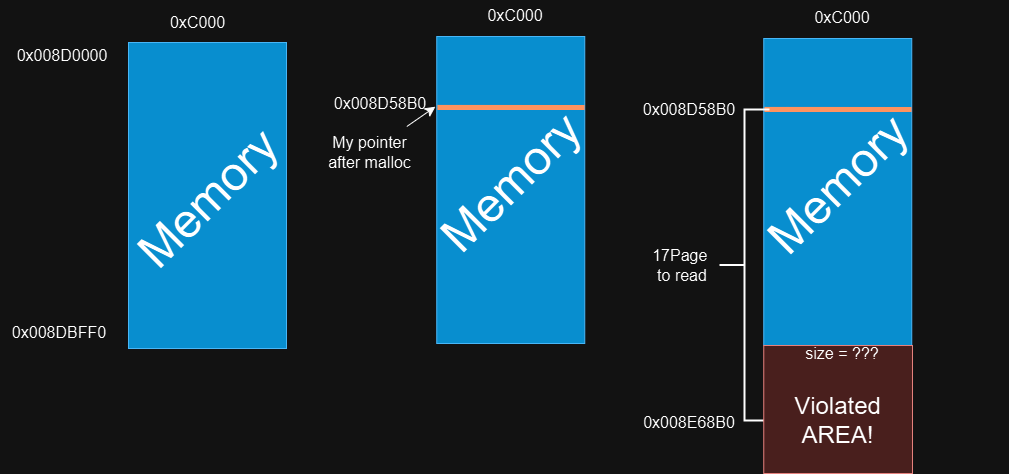
Assume our pointer is 0x008D58B0 after malloc. According to function it will read for 17 times. Memory range is “0x8D0000 to 0x8DC000” that function add 1 page to pointer for every turn. 0x8D58B0+0x1000… in 8. turn it will try to read “0x8DC8B0” OUT OF RANGE!!!
Its purposes to find memory’s end, it will detect it with EXCEPTION_ACCESS_VIOLATION.
Then it will catch that exception and set the pointer to read rest of the page. You can change the value (0xA000) to substract, it belong to my test’s result. So many times that allocation’s area is bigger than 10 pages at my tests.
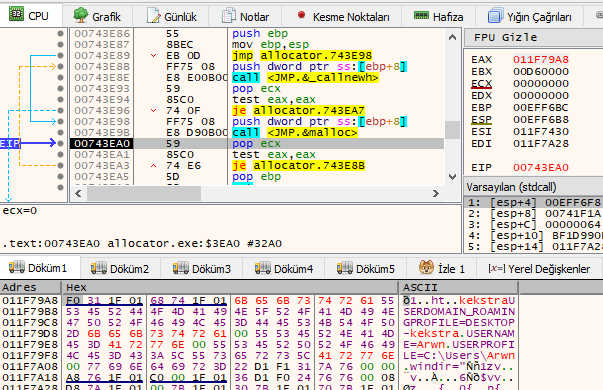
Check returned pointer and here what we are looking for!!
Of course its a little bit luck :))
Now we are sure our memory is allocated right area. Next job is getting that mapped memory into a string to read and parse.
Here is the function;
std::string read_memory(int temp) {
    std::string str1="";
    std::string store_string = "";
    //std::ofstream dosya("output.txt");

    for (int i = 0; i < 0x10000; i++) {
        __try {
            str1 = (char*)(temp + i);
        }
        __except (EXCEPTION_EXECUTE_HANDLER) {
            std::cout << "EXCEPTION_EXECUTE_HANDLER ";
            //return 0;
        }
        if (str1.length() > 5) {
            // add length to index for pointing to next string
            i = i + (str1.length() - 1);
            //dosya << str1;
            store_string += str1;
        }
        //std::cout << "[!] read memory = " << str1 << " len =" << str1.length() << std::endl;
    }
    return store_string;
}
Function above is getting strings at that memory and stores in a string to search patterns.
Search pattern
I’m going to show finding username.
std::string find_username(std::string store_string, int string_len) {
    std::string subStr = "";

    for (int i = 0; i < store_string.length(); i++) {
        if (store_string[i] == 'U' && store_string[i + 1] == 'S' && store_string[i + 3] == 'R' && store_string[i + 8] == '=') {
            //info("Maybee_debug");
            subStr = store_string.substr(i, 25); // first 9 byte is "USERNAME=" if username will be larger then 16byte it can't work correctly
            break;
        }
    }
    //subStr = subStr.substr(string_len, 14);
    subStr = my_substr(subStr,string_len,25);
    if (subStr == "") {
        //info("Find username again!");
        for (int i = 0; i < store_string.length(); i++) {
            if (store_string[i] == 'L' && store_string[i + 1] == 'O' && store_string[i + 3] == 'A' && store_string[i + 8] == 'D') {
                //info(store_string[i], store_string[i+1], store_string[24]);
                subStr = store_string.substr(i, 37);
                break;
            }
        }
        subStr = my_substr(subStr, 22, 25);
    }

    std::string temp_str = "C:\\Users\\";
    for (int i = 0; i < 25; i++) {
        temp_str += subStr[i];
        //std::cout << temp_str << " dir" << std::endl;
        dir_check = directoryExists(temp_str.c_str());
        if (dir_check) break;
    }

    //std::cout << temp_str << " Len: " << temp_str.length()<<std::endl;
    subStr = "";
    for (int i = string_len; i < temp_str.length(); i++)
        subStr += temp_str[i];

    return subStr;
}
I search for “USeRname=”, if I couldn’t find it search for “LOCALAPPDATA=C:\Users\”. When one of them detected, it will assume “%username%” will be next there. Then added “%username%” to the directory path, checked with accessing, flag will be set if present.
Desktop name also founded same method so I won’t add it to here, if you want to look its here
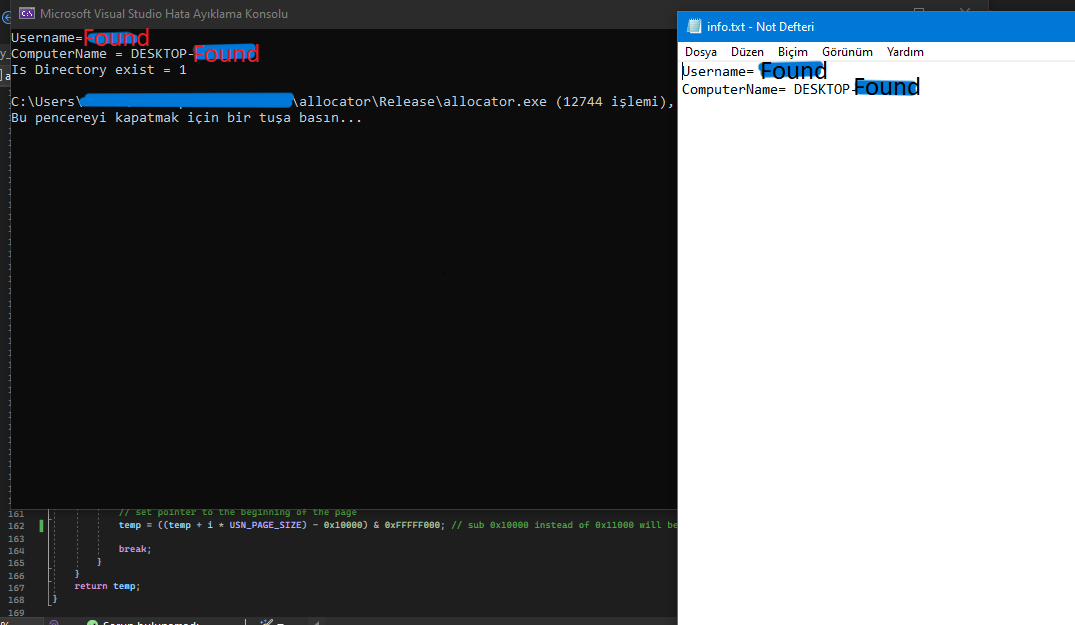
Tested many times accuracy is %95+
Summary
- I created my_substr function because original one is causing error.
- Memory section not fully retrieved, but enough for leak.
- Username and DesktopName retrieved without using any WINAPI.
- try-except was funny to struggle 🥱🥱
If you have any recommendation I would like to know it because this project is open to develop.
Resource
Full code -> github
~ The magic you are looking for is in the work you are avoiding.
