
Impossible-Disassembly
Anti-Analysis_102
Tell me something better than dealing with a reverse engineer(malware analyst)'s patience :))
Static analysis is the first stage . So you should disassemble it.
But do you know how the things is working?
Let’s examine it;
Introduction
Working on x86 programs and Windows PE files!!
When you drop a file to IDA, it will automatically read PE file information and know all the thing about file.
That was easy part, it just parsing the header. Then, .text section appear and funny part begin.
Disassembler resolve opcodes at the .text section to assembly code, also you can look assembly code’s opcode at the link.
-> 👉 x86asm_ref
I wanted to show it with images.
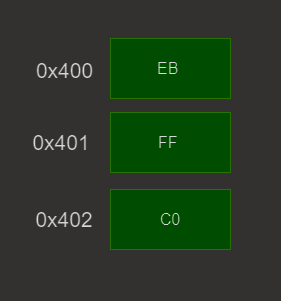
Here is the addresses and bytes.
Disassembler will interpret this as in the image below.
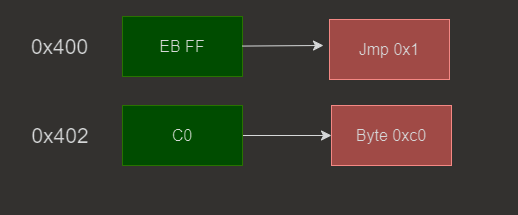
0x400 is the offset of “jmp” but you can see different jmp instructions.
This one is “short jump”(0xEB).
(You can try with x86_asm2disasm)
Short jump = A near jump where the jump range is limited to -128 to +127.
When a short jump executed, it will count after it’s own address. According to this image, it will begin from 0x402.
Now the tricky part, can we go back ?!?!?
Actually its still normal to go back, because sometimes compiler use jump to go back. For example if you put a label to back and call it with a condition, that label was near and behind so compiler going to use back jump.
But what if you turn back for just 1 byte ? 0x402 - 0x1 = 0x401!!
jmp, will back to it’s “own byte”, we just need to combine that byte with another byte which is gonna be “resolvable” for disassembler.
Reusing Byte
There was a link before, it should be somewhere up there. If you look at that link carefully, “FF” can be “increment”,
IF it is using with “C0 || C1 … C7”. You can chose one of these bytes to make “FF” byte to “inc” instruction.
I used “C0” -> inc eax(FF C0).
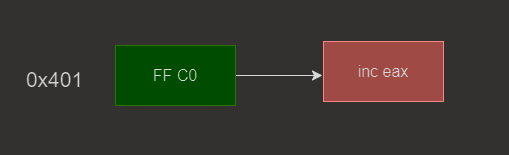
“FF” byte, executed for 2 times. But there is just 1 “FF” byte. Shhh IDA don’t know it.🤫
This is the reason why IDA can’t resolve it clearly and don’t show the program as graph view.
If you change “0xEB” opcode to “0x90” it will be fixed.
Disassembler & Debugger
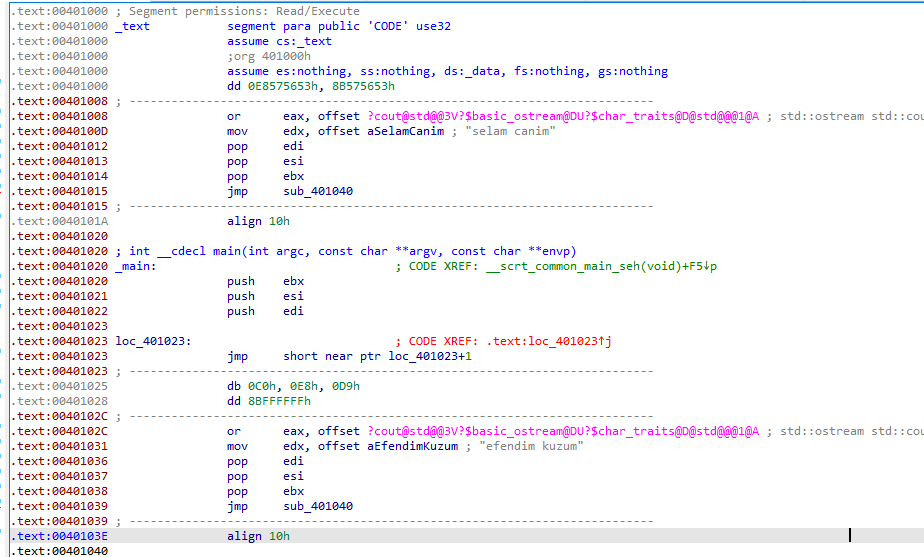
SUCH A MESSSS :)) There is nothing to understand but “jmp loc_+1”. That part is our magical touch.
As you can see all the code below jmp is corrupt and IDA disassemble it linear sweep. Because disassembler try to combine bytes with those which came later but in vain.
What you think about executing ? Will there a problem occure ?
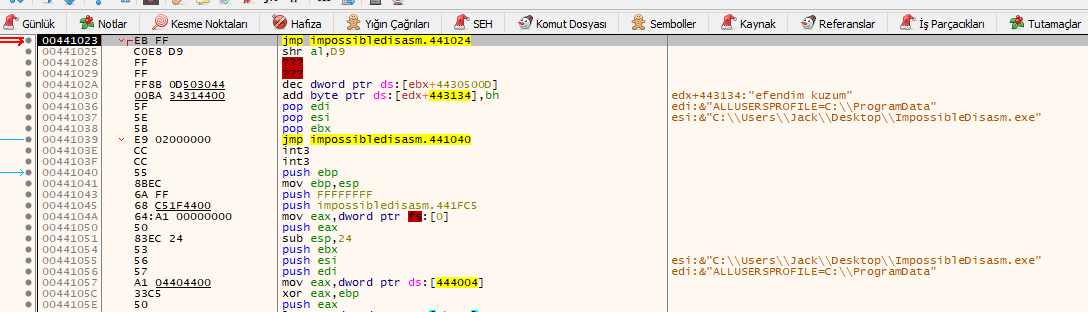
Still broken… execute next instruction -> {F8}
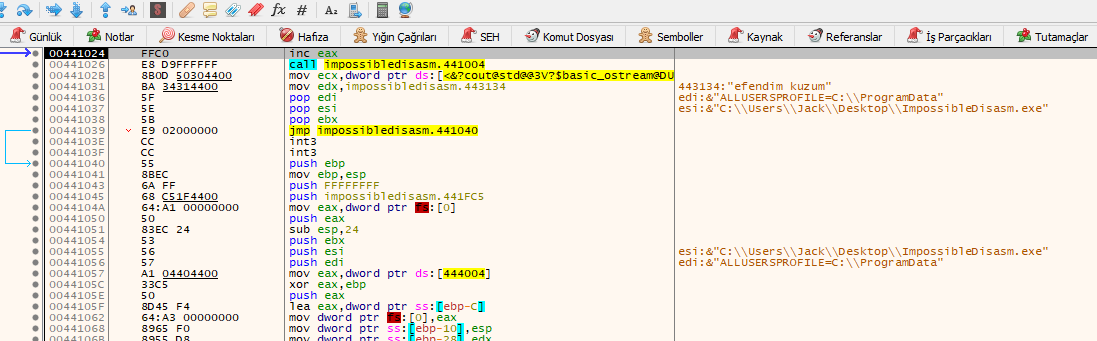
Fixed.
Check addresses, previous image -> 00441023 NOW -> 00441024. Just 1 byte and everything meaningful, now ligth is appear, life is clear.
So question’s answer is NO, there is nothing a problem with this program, it will work in runtime.
It is also valid when you try to call a function. Put an unnecessary byte at the beginning of the function and “call func+1”, so you will jump forward that byte but disassembler will try to combine that byte with all the other bytes at the function. Also compiler could add some code to your function’s beginning so you will jump that byte so be carefull about it.
How Fix it
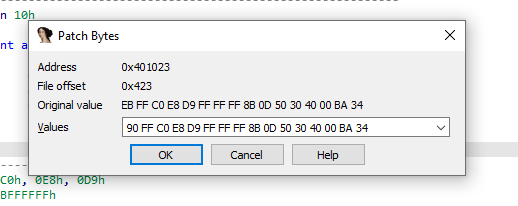
I didn’t remove that byte because I wanted to protect size, this is why I “nop”(0x90) it.
Actually we manually jump. Program will use “FF” byte for just 1 time.
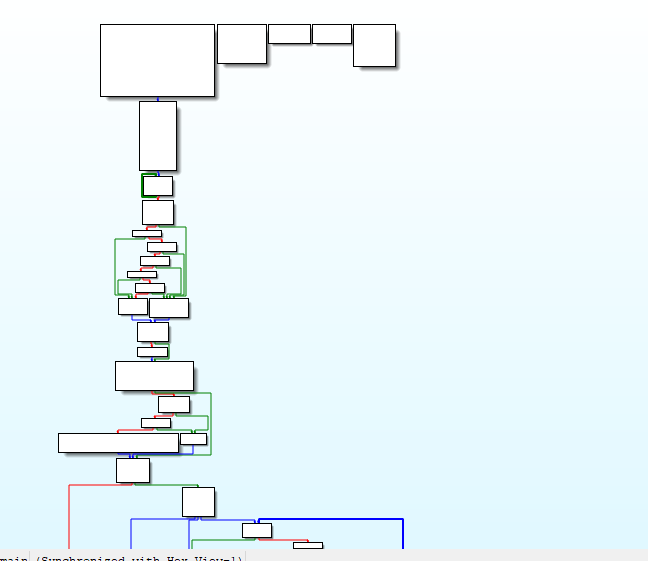
Now its end. Fixed graph, clean code. All the thing is you just find the breaking point and try to make it manually.
If you want to move dynamically, there is no problem with that, it will resolve but remember code flow can change be aware about what you see before executing.
Source Code
#include <iostream>

void naber() {
    __asm {
        _emit 0xE8
    }
    std::cout << "ZAYOTEM";

}


int main()
{
    __asm {
        _emit 0xEB
        _emit 0xFF
        _emit 0xC0
    };


    __asm {
        call naber+4
    }

    std::cout << "Fall in love with the process not the result";

}
Example created with MSVC22 and inline assembly.
Also I recommend to write this technic, its also funny to struggle with programming and you will notice more.
demo without call
demo2 added call
sourceCode
This is the last blog of this year
Merry christmas 🥳🥳
