
Shellcode-Execution
x86 Shellcode
When I started to Reverse Engineering journey with malware analysis, always looking for a
shellcode at any address call. Of course I didn’t know how I can detect it but I want to find
something like that because it seems so cooool.
Nowadays I’ve come across a shellcode which is running inside WINAPI, then I wanted to try create a shellcode and executing with WINAPI. (of course it worked :))
So We will be examining how it work and inspect how to detect.
Creating Shellcode
You can reach the source codes and header file from references or my github 👉 Github
#include <Windows.h>
#include "peb-lookup.h"

// It's worth noting that strings can be defined nside the .text section:
#pragma code_seg(".text")

__declspec(allocate(".text"))
wchar_t kernel32_str[] = L"kernel32.dll";

__declspec(allocate(".text"))
char load_lib_str[] = "LoadLibraryA";

int main()
{
    // Stack based strings for libraries and functions the shellcode needs
    wchar_t kernel32_dll_name[] = { 'k','e','r','n','e','l','3','2','.','d','l','l', 0 };
    char load_lib_name[] = { 'L','o','a','d','L','i','b','r','a','r','y','A',0 };
    char get_proc_name[] = { 'G','e','t','P','r','o','c','A','d','d','r','e','s','s', 0 };
    char user32_dll_name[] = { 'u','s','e','r','3','2','.','d','l','l', 0 };
    char message_box_name[] = { 'M','e','s','s','a','g','e','B','o','x','W', 0 };

    // stack based strings to be passed to the messagebox win api
    wchar_t msg_content[] = { 'H','e','l','l','o', ' ', 'W','o','r','l','d','!', 0 };
    wchar_t msg_title[] = { 'D','e','m','o','!', 0 };

    // resolve kernel32 image base
    LPVOID base = get_module_by_name((const LPWSTR)kernel32_dll_name);
    if (!base) {
        return 1;
    }

    // resolve loadlibraryA() address
    LPVOID load_lib = get_func_by_name((HMODULE)base, (LPSTR)load_lib_name);
    if (!load_lib) {
        return 2;
    }

    // resolve getprocaddress() address
    LPVOID get_proc = get_func_by_name((HMODULE)base, (LPSTR)get_proc_name);
    if (!get_proc) {
        return 3;
    }

    // loadlibrarya and getprocaddress function definitions
    HMODULE(WINAPI * _LoadLibraryA)(LPCSTR lpLibFileName) = (HMODULE(WINAPI*)(LPCSTR))load_lib;
    FARPROC(WINAPI * _GetProcAddress)(HMODULE hModule, LPCSTR lpProcName)
        = (FARPROC(WINAPI*)(HMODULE, LPCSTR)) get_proc;

    // load user32.dll
    LPVOID u32_dll = _LoadLibraryA(user32_dll_name);

    // messageboxw function definition
    int (WINAPI * _MessageBoxW)(
        _In_opt_ HWND hWnd,
        _In_opt_ LPCWSTR lpText,
        _In_opt_ LPCWSTR lpCaption,
        _In_ UINT uType) = (int (WINAPI*)(
            _In_opt_ HWND,
            _In_opt_ LPCWSTR,
            _In_opt_ LPCWSTR,
            _In_ UINT)) _GetProcAddress((HMODULE)u32_dll, message_box_name);

    if (_MessageBoxW == NULL) return 4;


    // invoke the message box winapi
    _MessageBoxW(0, msg_content, msg_title, MB_OK);

    return 0;
}
I used MSVC22 and x86 so somethings is different with that source.
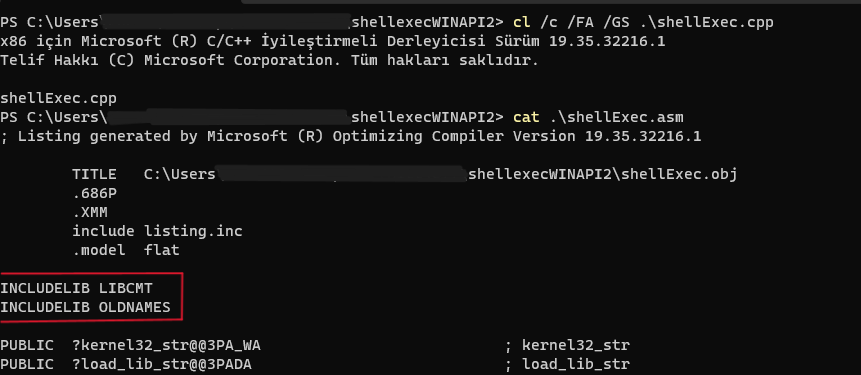
We need to get an asm file. After opening command line inside MSVC we should compile it with given parameters.
“cl /c /FA /GS .\shellExec.cpp”
Now the time to rearrange assembly file.
Remove area marked in red, then add below codes there.
_TEXT	SEGMENT

AlignESP PROC
    push esi ; Preserve RSI since we're stomping on it
    mov esi, esp ; Save the value of RSP so it can be restored
    and esp, 0FFFFFFF0h ; Align RSP to 16 bytes
    sub esp, 020h ; Allocate homing space for ExecutePayload
    call _main ; Call the entry point of the payload
    mov esp, esi ; Restore the original value of RSP
    pop esi ; Restore RSI
    ret ; Return to caller
AlignESP ENDP
We didn’t put “_TEXT ENDS” so we should close first “_TEXT SEGMENT”.
Also if you encounter with some error and if there is not important you can remove it, but be sure to not broke the actual code. If you shouldn’t remove a call, maybe you can assign a value to eax to be sure program will work correct.
Find “mov eax, DWORD PTR fs:48” and change it with given code.
	ASSUME FS:NOTHING
    MOV EAX, FS:[030H]
    ASSUME FS:ERROR
This will provide us to PEB and after this program going to take ntdll address. [EAX+C]
Now it's ready to create an executable.
“ml .\shellExec.asm /link /entry:AlignESP”
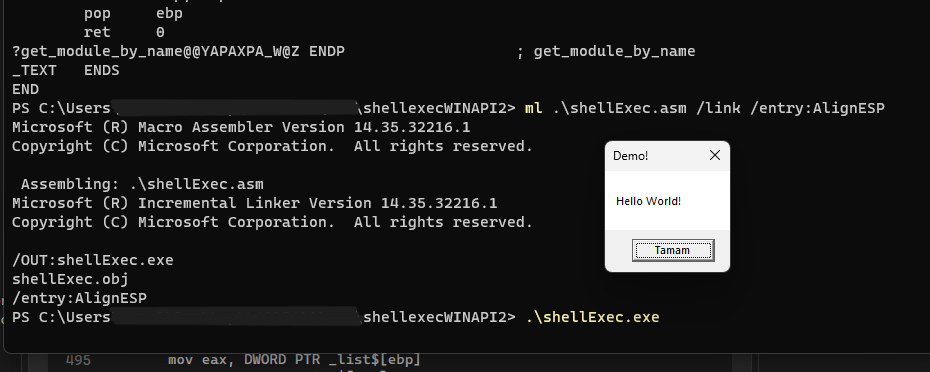
Ok it work. But its executable, we just need opcodes.
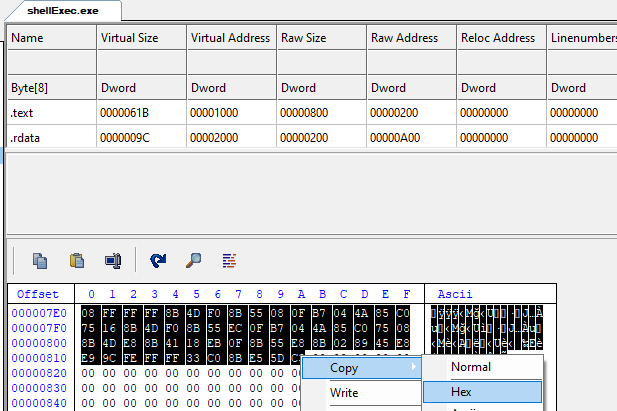
We only consider with “.text” section.
61B is the size of opcodes and 200 is where opcodes beginning at hex editor.
We should copy 200 -> 81B as hex.
Shellcode end but we didn’t finish.
Combine with WINAPI
#include <Windows.h>
#include <iostream>

int main()
{
    HANDLE hc = HeapCreate(HEAP_CREATE_ENABLE_EXECUTE, 0, 0);
    void* memory = HeapAlloc(hc, 0, 0x100000);


   const char* data = "479CG592D5G192DB31D93D1111119CD74DB25B7G70755B78736370636850111111117C11741163117D1174117B11221123113D1175117B117B111111449CDB90DB8B111111C91011111122B49854GBC9"
        "7C1111117798548BC87411111177985E8DC@63111111779844@1C97D111111779854@3C87411111177985E@5C@7B111111779844@7C922111111779854@9C82311111177985E@@C@3D111111779844@BC975111111779854"
        "@DC87B11111177985EC1C@7B111111779844C322B1779854C5B754E55BB754E47GB754E770B754E675B754E95BB754E878B754E@73B754EC63B754EB70B754EE63B754ED68B754EG50B754D111B754B556B754B474B754B7"
        "65B754B641B754B963B754B87GB754B@72B754BC50B754BB75B754BE75B754BD63B754BG74B754E162B754E062B754E311B754G164B754G062B754G374B754G263B754G522B754G423B754G73DB754G675B754G97BB754G8"
        "7BB754G@11B754D55EB754D474B754D762B754D662B754D970B754D876B754D@74B754DC53B754DB7GB754DE69B754DD46B754DG11C85911111177985E91C@7411111177984493C97B11111177985495C87B11111177985E"
        "97C@7G11111177984499C9311111117798549@C84611111177985E9BC@7G1111117798449DC96311111177985481C87B11111177985E83C@7511111177984485C9301111117798548722B877985E89C@55111111779844C9"
        "C974111111779854C@C87E11111177985ECBC@7G111111779844CDC930111111779854B122B877985EB39E448B43D92B13111192B51598946BGGGGGG92CE6BGGGGGG11641@C910111111D8C91111119E54E5419C9E6BGGGG"
        "GG40D9C711111192B519989469GGGGGG92CE69GGGGGG11641@C913111111D89B1111119E44B5439C946BGGGGGG41D99@11111192B519989465GGGGGG92CE65GGGGGG116416C912111111DC729C9E69GGGGGG989E7BGGGGGG"
        "9C8465GGGGGG988475GGGGGG9E54G141GG847BGGGGGG989479GGGGGG9E5ED5409C8479GGGGGG43GG8475GGGGGG989461GGGGGG92CE61GGGGGG116416C915111111DC057@119E54C9419E5E91407@11GG8461GGGGGG22B19C"
        "5EGB22BEC9101111119CD44EB2449CDB92DB2B9C54199854DB9C5EDB1GC60090G@5E4@1111651622B1D8241011119C54DB9C5E1912592B985ED5C@191111117CB3119C5ED59E4510699844D99C54D9922911641622B1D819"
        "1011119C5ED99C009844D19C54D11254199854G59C5EG59C40099844EB9C54G59C590B985EE19C44G59C53319854E99C5EG59C40359844E5B654G911111111DC189C54G992B1109854G99C5EG92C5EEB1G92C21111119C44"
        "191244E99C54G99E1B93985EB99C44191244E59C54G99E1B53985EBB9C44191244E19C54BB1GC6199E059@9844B59C54B99C5E191219985EG1B654GB11111111B654GB11111111DC189C44GB92B3109844GB9C541B1254GB"
        "1GCD1994B865369C44G11244GB1GCD1394B1650@9C5E1B125EGB1GCD009C54G11254GB1GCD192CE06513DC13DCB29C441B1244GB1GCD1394B164089C5EG1125EGB1GCD0094E3641B9C54B59C5E1912199CB0DC16D829GGGG"
        "GG22B19CD44EB2449CDB92DB25B654D51111111175@0211111119854D59C5ED59C401B9844E99C54E99C591B9C4101985EBB9844E19C54BB9854E59C5EE5985ED9926ED9111G954@1011119C44D9926@09111G955E101111"
        "9C54D9926921116413DCED9C5ED99C40219844DBB654G111111111B654G111111111DC189C54G192B1109854G19C5EG19C44191GC6155@94B11G95EE1111119C5EG19C44DB1GC6155@94B11G95BC1111119C5EG19C44191G"
        "C6155@92G94@6G269C5EG19C44191GC6155@92G9506B399C5EG19C44191GC6155@92B1319854D19C5EG19C4419779C54D17798155@779C5ED177985EGDDC1D9C44G19C5419779C1B4177985EGD779C44GD779844G99C54G1"
        "9C5EDB1GC6055092G@4@6G269C54G19C5EDB1GC6055092G@506B399C54G19C5EDB1GC6055092B3319844EB9C54G19C5EDB779C44EB77980550779C54EB779854GBDC1D9C5EG19C44DB779C155@779854GB779C5EGB77985E"
        "G51GC644G91GC654G52CE16513DC14D819GGGGGG9C5EG19C44191GC6155@94B164079C5EG19C44DB1GC6155@94B164199C5ED99C5009DC1G9C44D99C139854D9D88BGDGGGG22B19CD44EB2";
    // data ^ 1 ;

    size_t dataSize = strlen(data) / 2;

    for (size_t i = 0; i < dataSize; ++i) {
        // İki hexadecimal karakteri bir byte'a dönüştürün
        // Turn into byte from hex
        char byte[3] = { data[i * 2]^1, data[i * 2 + 1]^1, '\0' };
        int value;
        sscanf_s(byte, "%02X", &value);

        // Bellekteki ilgili pozisyona kopyala
        // Copy to heap
        ((char*)memory)[i] = (char)value;
    }

    EnumSystemLocalesA((LOCALE_ENUMPROCA)memory, 0);

    CloseHandle(memory);

    return 0;
}
It could be use from resource instead of data, but I used like this because shellcode is short.
Analyst can recognize critical opcode like push, call, jmp, ret. I especially gave these example because at the beginning of the function almost all of them use push to operate stack dynamically. Besides, call and jump commands are common to use at the beginning of the program and it is easy to recognize it with address. Also compiler put prolog and epilog to the nearly every function even you didn’t.
Push opcodes could be between 50-57,
Call opcodes could be E8, E9, FF 15, (near call // far call)
RET opcodes could be C2, C3,
JMP opcodes could be E9, EA, EB, (other jump’s opcodes 70 -> 7F).
I suggest to memorize these opcodes and encrypt shellcodes more difficult than xor 1 :))
At the end of the resolving, allocated heap will passing as first parameter.
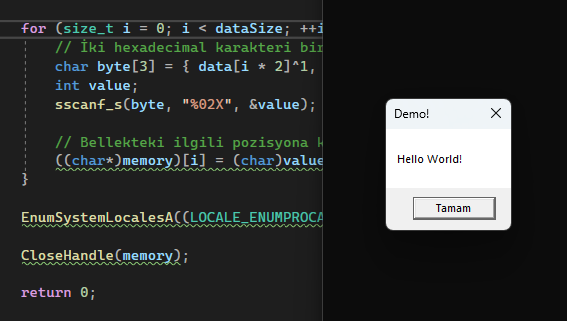
Analysis
Given code didn’t called allocated heap but shellcode executed.
Now time to debug it.
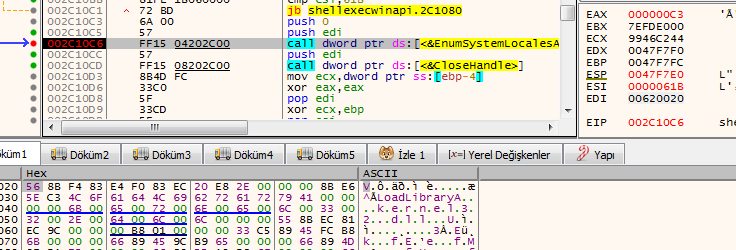
Clearly seen first parameter is pointing to our shellcode. [ EDI ]
When we dive into the function, there is a surprise for us 🤩.
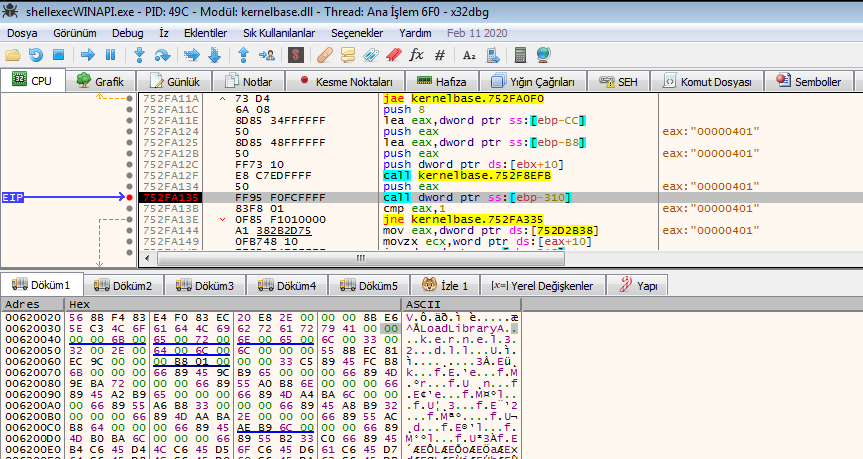
After a quick search, this is where shellcode executing and you can compare memory with previous image.
Of course, we don’t need to keep track of where the shellcode call. According to previous image shellcode starting from “00620020” address. So we put breakpoint to there, if program goes there, we can catch it 😋.
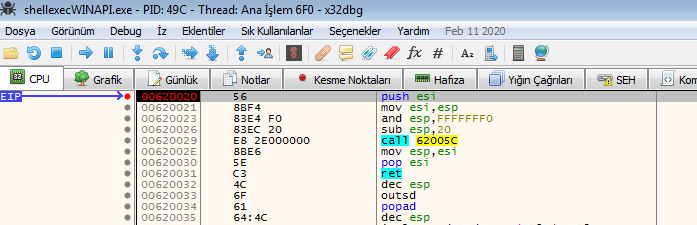
Here we are inside of shellcode. It will work independent to actual process it just need a PEB, so even if you can put it to another program’s EIP address it is going to work same.
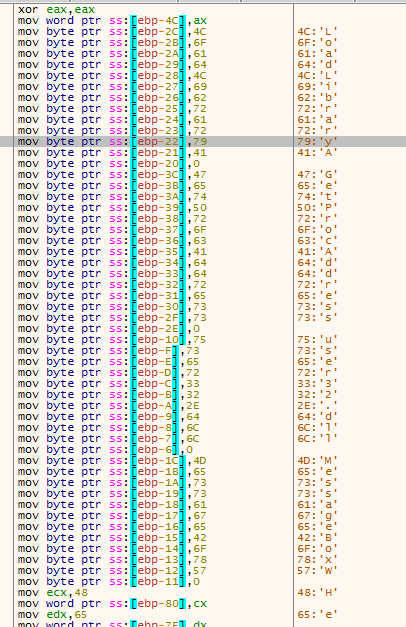
It will find and resolve APIs and DLLs it needs with the functions in the header file. After that MessageBoxW will be available.
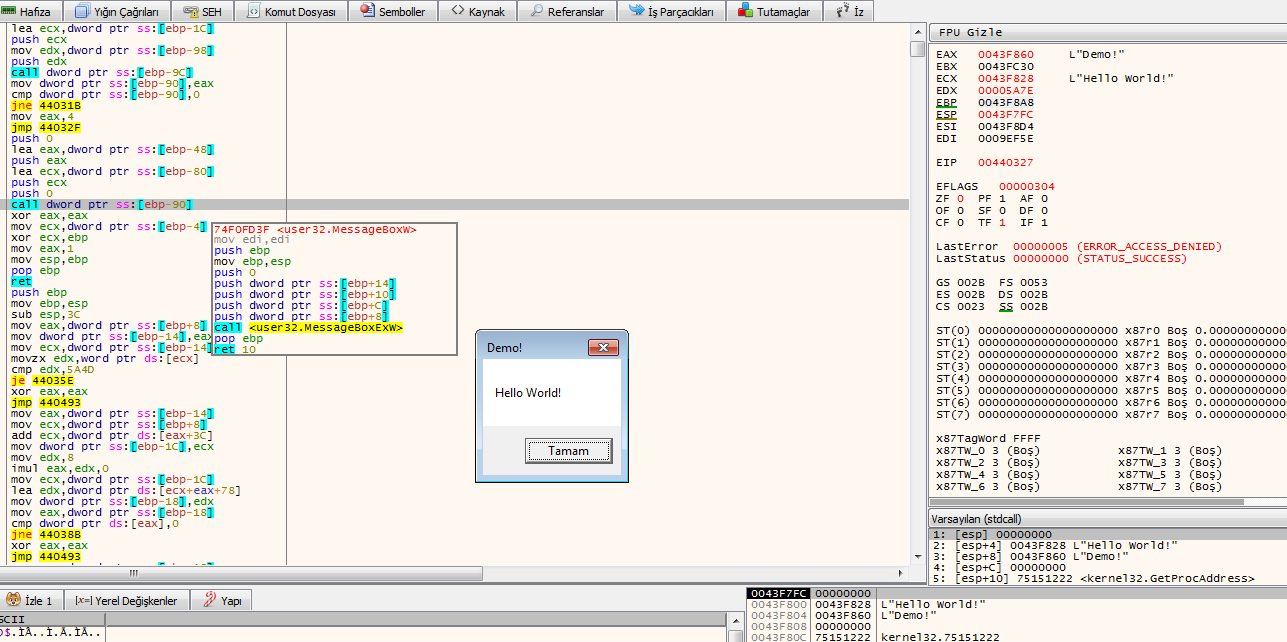
Can you believe whole shellcode just 1 line code at C++ 🤯
References
~When something can be read without effort, great effort has gone into its writing.
