
Kernel_Rop_Gadget

Windows Kernel ROP Gadget
Entrance
Approximately 2 years ago when I met with ROP. That time I didn’t even know ROP has gadgets :))
Firstly, I’m doing this because I came across an article about Windows Kernel Exploitation and they are using rop gadget tools from Linux. So, I decided to make it in Windows.
What we gonna do:
- Decode assembly to hex dynamically for find it in target file. It will be any of instruction, Rop/jop or just nothing related with exploit 😉
- Parse target file’s all executable sections. (default target file is ntoskrnl.exe)
- Searching for match in target section’s opcodes with the pattern(parameter) .
Shortly we are gonna take an input(which is assembly instructions) and search that gadgets in the driver.
If you remove driver related parts and gave a userland program path in the code. Taa-daaa you have userland rop-jop gadget finder.
Ready for Windows userkernelropjopgadgetsfinderandchaincreator ? Such a weird title it seems like random.🥱
Little Little Info in the Middle
- What is gadget ?
Actually these are just instructions. The key point is, when a researcher can change Instruction Pointer(RIP/EIP) with parameters, they are looking for any instructions to take control like “jmp esp” or whatever they need, they are looking for that instruction’s address but at the target file there not may be like that instructions BUT you can disassemble the target file from anywhere where you want because you will give the address to instruction pointer you don’t have to start from the file’s beginning. I guess image will be better for explanation ->
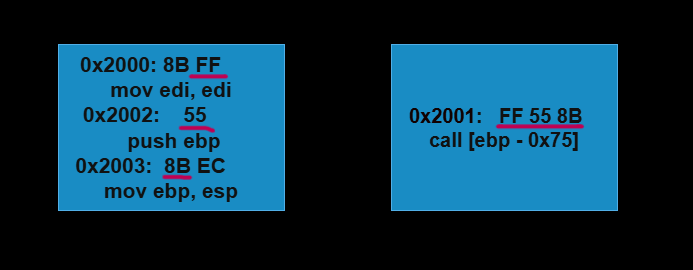
This is called as `Mid-Instruction Gadget`
Concept mentioned above is explained better in my previous post Impossible_disassembly.
- KASLR (Kernel Address Space Layout Randomization):
This is a protection against exploits. It randomizes the base address of kernel at every boot time. So nobody can use a static address to reaching any of kernel symbols.
- Why I didn’t use Kernel Address directly while searching pattern?
Because … Nvm you should try and see the result. Trust me it worth give a try if you don’t know.
Asm to Hex
In this project, we are not going to add specific opcodes. What does it mean ? If you search a little bit, so many of the gadget finder are statically added opcodes in the code and if you want to search out of their scope, sorry sweet heart you can’t.
Of course we are gonna make it better than that. How ? We are gonna decode asm dynamically with an external library named XEDParse
std::vector<BYTE>  AssemblyToHex(const std::string& asm_code) {

    if (asm_code == "") {
        std::cout << "God sake enter something!?!?!?!?\n";
        exit(1);
    }

    XEDPARSE parse;
    RtlZeroMemory(&parse, sizeof(parse));
    parse.x64 = true;  // 64-bit
    std::vector<BYTE> pattern = { };  // Search pattern  such 48 89 e0

    //std::cout << "Sended Assembly Code: " << asm_code << std::endl;
    std::vector<std::string> commands = SplitAssemblyCode(asm_code);

    //std::cout << "Filtered:\n";
    for (const auto& cmd : commands) {
        RtlCopyMemory(parse.instr, cmd.data(), cmd.length());
        //printf("This is your asm code :blink:  -> %s\t", parse.instr);

        if (XEDParseAssemble(&parse) == XEDPARSE_OK) {
            // machine code to HEX
            std::string hex_result;
            for (size_t i = 0; i < parse.dest_size; i++) {
                char buffer[3];
                snprintf(buffer, sizeof(buffer), "%02X", parse.dest[i]);
                hex_result += buffer;
                hex_result += " ";

                memset(parse.instr, 0, sizeof(parse.instr));
            }

            //std::cout<<"Hex's here !?!?!?! -> " << std::hex << hex_result << std::endl;

            for (size_t i = 0; i < parse.dest_size; i++) {
                std::string byteStr = hex_result.substr(i * 3, 2);
                BYTE byteValue = static_cast<BYTE>(std::stoi(byteStr, nullptr, 16));
                pattern.push_back(byteValue);

            }
        }
        else {

            std::cout << "You get error ehhh " << std::endl;
            exit(1);
        }
    }

    return pattern;
}
I’m not going to explain line by line, basically it decode assembly to hex into pattern variable and return it to use in searching. The SplitAssemblyCode() function splits instructions given by user according to punctuation “;”. You can find full code on my github
Search Patterns
Defaultly we will use “ntoskrnl.exe” but program will accept input for specific driver to search in. But it is not going to search in every driver in the system at the same time(not yet).
We will check the file if it is given or we are gonna assign default file to search.
 std::string asm_code = argv[1];  // Assembly commands(ex. "pop rbx;ret")
 std::string library = (argc == 3) ? argv[2] : "ntoskrnl.exe";  // if lib entered assign it, or ntoskrnl.exe

 std::vector<BYTE> pattern = { };  // initialize

 pattern = AssemblyToHex(asm_code);

 searchPattern(library.c_str(), pattern, asm_code);
We prepared our inputs for searchPattern, now let’s check it.
int* searchPattern(const char* fileBin, std::vector<BYTE> userPattern, std::string asm_code) {

	std::string filename = get_driver_path(fileBin).c_str(); // statically change if you want to use for userland
	std::string outputFileName = "FoundedGadgets.txt";


	HANDLE loadFile = LoadLibraryA((LPCSTR)filename.c_str());
	if (!loadFile)
	{
		std::cout <<"Auf Wiedersehen\n";
		printf("[!] Failed to get a handle to the file - Error Code (%d)\n", GetLastError());
		CloseHandle(loadFile);
		exit(1);
	}

	IMAGE_NT_HEADERS* ntHeaders = (IMAGE_NT_HEADERS*)((BYTE*)loadFile + ((IMAGE_DOS_HEADER*)loadFile)->e_lfanew);
	IMAGE_SECTION_HEADER* sectionHeader = IMAGE_FIRST_SECTION(ntHeaders);

	unsigned long long baseAddr = kernelAddress(fileBin); // change it with loadFile variable for userland gadgets
	if (!baseAddr) {
		std::cout << fileBin << " not found" << std::endl;
		exit(1);
	}

	std::ofstream filein(outputFileName, std::ios::binary);
	if (!filein) {
		std::cout << "Error opening the file for reading.";
		return nullptr;
	}

	std::vector<BYTE> pattern;  // Searching pattern example: 48, 89, e0
	for (BYTE byte : userPattern) {
		pattern.push_back(byte);
	}

	if(!chain) // we are gonna put some print if it is not chain
	{

		std::cout << fileBin << " Address: 0x" << std::hex << baseAddr << std::endl << "Assembly: " << asm_code << std::endl,
			filein << fileBin << " Address: 0x" << std::hex << baseAddr << std::endl<< "Assembly: " << asm_code << std::endl;

	// print files base address and size
	//std::cout << "Base Address: " << loadFile << std::endl;
	//std::cout << "Size of Image: " << (DWORD)ntHeaders->OptionalHeader.SizeOfImage << " bytes\n";

		std::cout <<"Hex Code: ",
			filein << "Hex Code: ";

		for (BYTE byte : pattern) {
			std::cout << std::hex << "0x" << static_cast<int>(byte) << " ",
				filein << std::hex << "0x" << static_cast<int>(byte) << " ";
		}


		std::cout << std::endl << std::endl,
			filein << std::endl << std::endl;


}// no chain part is end

	bool something = 0; // something may go wrong ehehe

	for (int i = 0; i < ntHeaders->FileHeader.NumberOfSections; i++) {
		if (sectionHeader[i].Characteristics & IMAGE_SCN_MEM_EXECUTE) {
			uintptr_t sectionStart = (uintptr_t)((BYTE*)loadFile + sectionHeader[i].VirtualAddress);
			size_t sectionSize = sectionHeader[i].Misc.VirtualSize;

			Section newSection;
			newSection.startAddress = sectionStart;
			newSection.length = sectionSize;


			for (size_t j = 0; j < sectionSize; j++) {
				newSection.data.push_back(*((BYTE*)sectionStart + j));
			}

			// target pattern (example 0x59, 0xC3)

			size_t patternSize = pattern.size();

			// search pattern every section
			for (size_t offset = 0; offset <= sectionSize - patternSize; offset++) {
				bool match = true;

				// compare patterns
				for (size_t k = 0; k < patternSize; k++) {
					if (newSection.data[offset + k] != pattern[k]) {
						match = false;
						break;
					}
				}

				if (match) {
					something = TRUE;

					// this offset is taken from section's address, not libraries baseAddress
					//std::cout  << std::endl << "myOffset -> 0x" <<std::hex<< offset << "\t";
					//std::cout << "SectionStart -> " << sectionStart << std::endl;

					//uintptr_t foundAddress = sectionStart + offset;  // Bulunduğu adres
					//std::cout << "\nPattern found at offset: 0x" <<std::hex<< offset
					//	<< ", Address: 0x" << (void*)foundAddress << std::endl;

					// Gadget's userland address
					uintptr_t userAddress = sectionStart + offset;
					//std::cout << "User Address: 0x" << (void*)userAddress << "\t\t" ;

					// Gadget's offset from the file's beginning
					size_t myOffset = userAddress - (size_t)loadFile;
					//std::cout << "FinalOffset -> 0x" << myOffset << "\t";

					// Gadget's kernel address
					size_t kernelAddres = myOffset + baseAddr;
					//std::cout << "kernelAddres -> 0x" << kernelAddres << std::endl;

					if (chain)
						return (int*)myOffset;

					std::cout << std::endl << "Address -> 0x" << std::hex << kernelAddres << "\t" << asm_code << "\tOffset: " << "0x" << myOffset,
						filein << std::endl << "Address -> 0x" << std::hex << kernelAddres << "\t" << asm_code << "\tOffset: " << "0x" << myOffset;

				}
			}
		}
	}


		if (!something) {
			std::cout << "Nothing founded or something went wrong. Please check your input file or change it\n ";

			if(!chain)
			filein << "Nothing Founded :/\n";

			exit(1);
		}

		if(!chain)
		std::cout << "\nOutput written to file " << outputFileName << std::endl;

	return nullptr;
}
get_driver_path(…) function is getting full path of driver via driver name. If can’t, it return empty string.
kernelAddress(…) return the given driver’s kernel address. You can reach these from github.
I’m gonna skip ordinary function checks and directly dive into important part like getting sections.
We only need to executable sections so we check for “IMAGE_SCN_MEM_EXECUTE” flag, if it is executable then we are gonna start to search our pattern at that section. Commonly tools take the “_text” section but there is more.
if (newSection.data[offset + k] != pattern[k]) {
Program will check for every byte of executable section and if this condition not met it means gadget found.
KASLR Bypass
	uintptr_t userAddress = sectionStart + offset;
	size_t myOffset = userAddress - (size_t)loadFile;
	size_t kernelAddres = myOffset + baseAddr;
Gadget’s offset and section’s beginning address are stored, so it means we can calculate userland address.
Also we can find actual offset of the gadget from the beginning of the loaded file.
Then we just add actual offset to driver’s returned base address.
Yeah it is weird to Microsoft gave us the kernel address FREE KASLR BYPASS
After this just printing to console and to the file. Of course I’m not gonna explain that 🥱
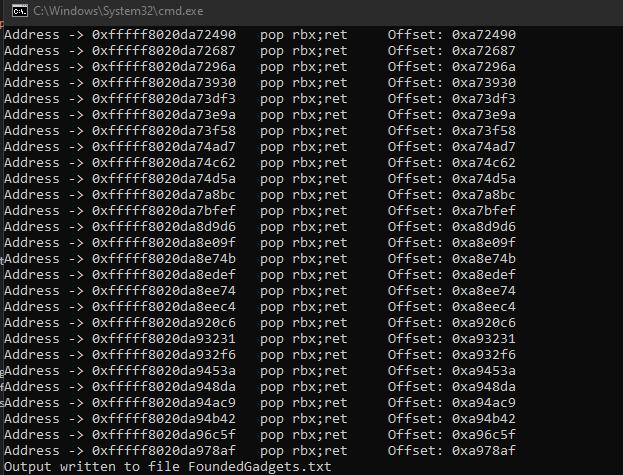
I suppose this is the end :/
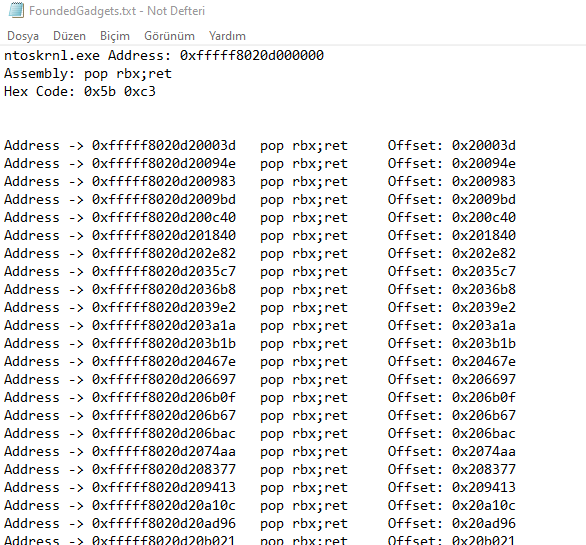
Chain Creator
There is nothing different important thing other than the gadget finder.
This just take more than one gadget and additionally it allows you to add hex to your chain. It only retrieve the first gadget from the file. So you won’t see different address at same gadgets but if you wish you can manually add different addresses by using other option.
if (argv[1] == (std::string)"chain") {

    std::cout << "Rop chain!?!?" << std::endl;

    chain = TRUE;

    std::cout << "Type Driver name or anything hit enter. (default driver ntoskrnl.exe)\n";
    std::string library = "";
    std::cin >> library;

    if (library.length() > MAX_PATH) {
        std::cout << "it would be better to change the driver name\n"; exit(1);
    }

    if (get_driver_path(library.c_str()) == "") {
        std::cout << "Driver couldn't founded. Default driver is loaded\n";
        library = "ntoskrnl.exe";
    }
    else {
        std::cin.ignore();
    }
    //std::cout << "Values are going to be hex, asm instruction should be divided with \";\" and \ngadgets offset will be returned in the chain. All lines are going to be 64 bit\n";

    std::string chainLine;

    std::cout << "Type \"end\" for out\n";
    std::vector<uint64_t> chainStorage;

    while (TRUE) {
        std::cout << "Type asm instruction or value. asm;asm \n";
        std::string chainLine;
        std::getline(std::cin, chainLine);

        if (chainLine == "end") goto outside;

        //std::cout << "You entered: " << chainLine << std::endl;

        if (asmValidation(chainLine)) {
            std::cout << "this is debug\n";

            // valid
            //get first gadget
            std::vector<BYTE> pattern = { };  // initialize
            pattern = AssemblyToHex((const std::string&)chainLine);
            int* firstGadgetOffset = searchPattern(library.c_str(), pattern, chainLine); // it will return first gadget's offset for all the time

            chainStorage.push_back(reinterpret_cast<uint64_t>(firstGadgetOffset));

            //std::cout << "galiba basardin\n"; // YOU DID IT BASTARD
            //for (uint64_t value : chainStorage) {
            //    std::cout << std::hex << value << std::endl;
        //}

        }
        else {

            //this is not asm code
            //chainStorage.push_back((uint64_t)chainLine.c_str());
            try {
                chainStorage.push_back(std::stoull(chainLine, nullptr, 0));
            }
            catch (const std::exception& e) {
                std::cout << "Invalid input or failed to parse input: " << e.what() << std::endl;
                exit(1);
            }
        }
        std::cout << "Values added\n";

    }

outside:

    std::cout << "Your rop chain: only driver's Offsets and Values\n\n";

    for (uint64_t value : chainStorage) {
        std::cout << "0x" << value << std::endl;
    }

    return 0;
}
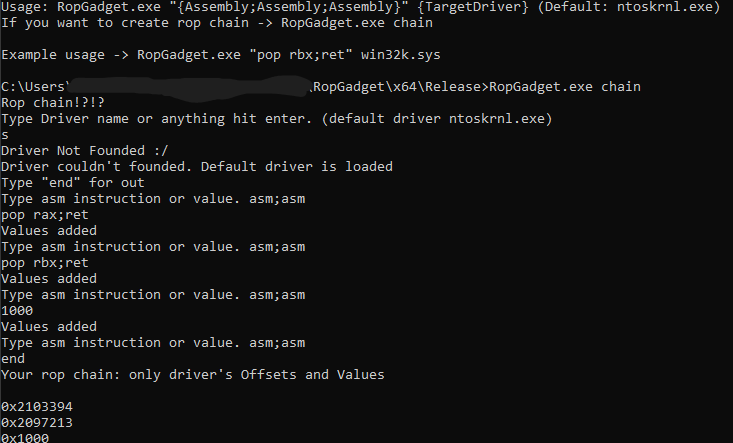
Have fun.
End
I made it as Windows Kernel ROP gadget but it can be used for JOP gadget and with a little touch it can support userland.
If you want to add or fix something to this project as contributor, just contact with me.
Also I have no source for this example but I can share the blog page which I inspired to make this project. -> HEVD_EXPLOIT
My related blogs here ->
ImpossibleDisassembly -> Mid-Instruction Gadget
Hex_to_asm -> This is opposite of the asm to hex if you wish to look
ROP_Return-Oriented-Programming -> You know why
~ Victory is celebrated in the light, but it is won in the darkness - Dune
