
Polymorphic-Code

Polymorphic Code
- What is Polymorphic Code ?
Without changing original algorithm at the target code, creating another code. This is simply explanation of the Polymorphic Code. It seems like different code but it still same.
- How it works ?
This is main purpose of this blog, but with my way :))
- Why ?
Purpose of Polymorphic Code is obfuscation. After you have it, no need to think about hash based detection and it causes every analyst thinking they are analyzing different binary.
I have already mentioned about “changing code” at my self_modifying_code article. Now we are making it with different way. This program going to take a binary as an input then it will create another binary according to input. Every time this program execute, it will create another file (new hash). This is the idea and it is not changing at runtime, it will produce same file with different hash at every executation. Whole changes will be in “.text” section.
Steps
- Create a struct for necessary PE header’s variables
- Parse input PE file and get header’s members which are important for us
- Disassemble target PE file (I used a library for this. “Zydis”)
- Find proper instructions to change without broke the original file (Most important part)
- Randomly change instructions
- Create new file with original file’s header and whole sections except “.text”, we are going to write modified “code section” to there.
(If you are not familiar with PE file structure you can read my first article PE file)
Warm Up
Firstly I started with PE parsing because we need “.text” section to disassemble.
struct sender {
	int* textBaseAdress; // beginning of the code section
	int size; // size of the code section
	int* entryPoint; // entrypoint is VA so code section is start at 0x1000(baseOfCode) but in raw file it start at 0x400(pointerToRawData)
	int entryOffset; // it will be used in  "broken disassemble" case
	int rawTextoffset; // It usually 0x400 but I will take it
	int architecture; // it will added
};

sender PeParser(char* getFileName)
{

	std::string filename = (string)getFileName;


	HANDLE loadFile = CreateFileA(filename.c_str(), GENERIC_ALL, FILE_SHARE_READ, NULL, OPEN_EXISTING, FILE_ATTRIBUTE_NORMAL, NULL);

	//check handle
	if (loadFile == INVALID_HANDLE_VALUE)
	{
		printf("[!] Failed to get a handle to the file - Error Code (%d)\n", GetLastError());
		printf(" filename -> %s\n", filename);
		CloseHandle(loadFile);
		exit(1);
	}

	DWORD nNumberOfBytesToRead = GetFileSize(loadFile, NULL);
	LPVOID lpBuffer = HeapAlloc(GetProcessHeap(), 0, nNumberOfBytesToRead);

	DWORD lpNumberOfBytesRead = { 0 };
	if (!ReadFile(loadFile, lpBuffer, nNumberOfBytesToRead, &lpNumberOfBytesRead, NULL))
	{
		printf("[!] Failed to read the file - Error Code (%d)\n", GetLastError());
		CloseHandle(loadFile);
		exit(1);
	}

	// Now we are parsing readed file
    // lfanew is point to NT header
	int* peHeader = (int*)lpBuffer + ((int)((PIMAGE_DOS_HEADER)lpBuffer)->e_lfanew) / 4;
	if (((PIMAGE_NT_HEADERS32)peHeader)->OptionalHeader.Magic != IMAGE_NT_OPTIONAL_HDR32_MAGIC) {
		cout << "usta biz x86 bakiyoruz\n" << endl; // only for x86 arch
		//senderVar.architecture == 0x64; // It will added
		exit(1);
	}


	PIMAGE_SECTION_HEADER imageSectionHeader = { 0 };
    // After adding whole NT headers size to pe header, we will reach to section headers beginning
	imageSectionHeader = (PIMAGE_SECTION_HEADER)(peHeader + sizeof(IMAGE_NT_HEADERS32) / 4);
    // While first section is ".text", first raw address is ".text"
	DWORD textBegin = imageSectionHeader->PointerToRawData;

	unsigned char* TextSection = (unsigned char*)((int*)lpBuffer + textBegin / 4);

	sender senderVar;
    // get necessary variables to use
    senderVar.textBaseAdress = (int*)TextSection; // beginning of the code section
	senderVar.size = imageSectionHeader->SizeOfRawData; // size of the code section
	senderVar.entryOffset = (((PIMAGE_NT_HEADERS32)peHeader)->OptionalHeader.AddressOfEntryPoint - ((PIMAGE_NT_HEADERS32)peHeader)->OptionalHeader.BaseOfCode + imageSectionHeader->PointerToRawData); // entrypoint is VA so code section is start at 0x1000(baseOfCode) but in raw file it start at 0x400(pointerToRawData)
	senderVar.entryPoint = (int*)((unsigned char*)((int*)lpBuffer + senderVar.entryOffset / 4)); // it will be used in  "broken disassemble" case
	senderVar.rawTextoffset = textBegin; // It usually 0x400 but I will take it

	CloseHandle(loadFile);

	return senderVar;
}
The code above is initial part of this article, so please read comment lines first.
We just get .text section and size but some files can not disassemble with that, so when it happens program will use entrypoint to disassemble.
Now we got entrypoint and code section informations. Next step ->
Getting Hot
After getting text section and size, now we will give it as a parameter to disassembler.
ZydisDecoderInit(&decoder, ZYDIS_MACHINE_MODE_LEGACY_32, ZYDIS_STACK_WIDTH_32);
For now, I will do it only for x86 arch, so it arranged as 32 bit.
DisassembleBuffer(&decoder, &data[0], size); // zydis library
Don’t forget values are hexadecimal in here!
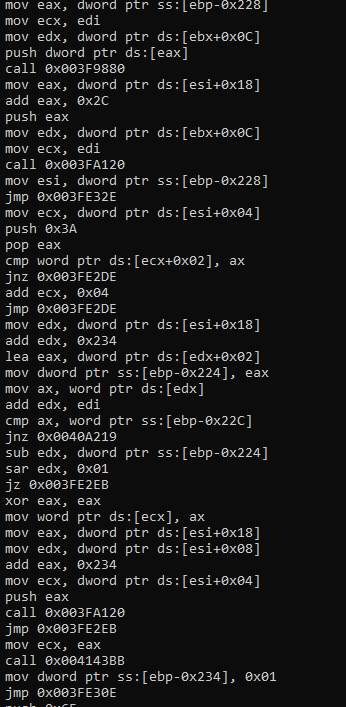
Actually this is okay, but I like playing with hex. Let’s print it with hex values.
        for (ZyanUSize i = 0; i < instruction.length; ++i)
            printf("%02X ", data[i]); // Print opcodes
When you add it to disassemble function, it will print instruction’s hex values it step by step.
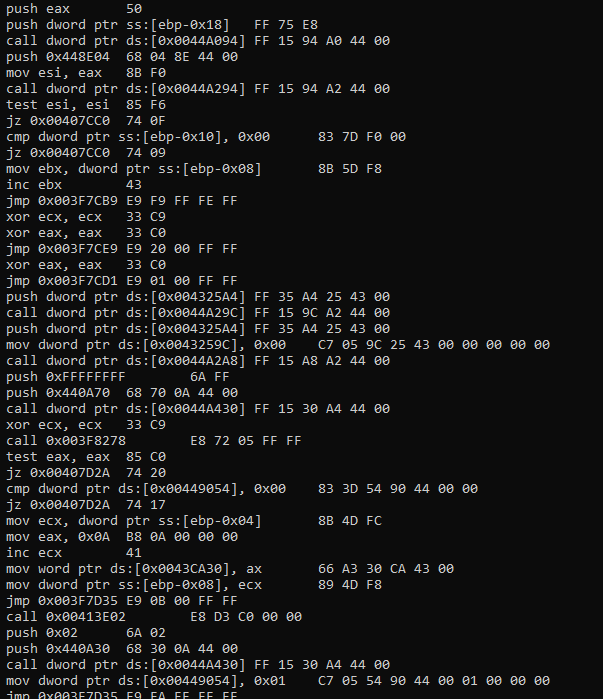
This is what we need to catch suitable patterns. It means we can check instructions with their opcodes. Next step ->
Melting
Previous part was just preparation.
Here the thing, we will change “.text” section but we can not change the original code flow and algorithm.
So, how we can do it ?
Firstly, we can not change the file size, it is important!
We have to find the equivalent instructions.
What does it mean? Let me show you an example at the below
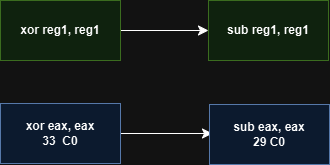
Both of them make eax register 0, it seems suitable and really good right ?
            // xor and sub
            if ((data[0] == 0x33 || data[0] == 0x29) && instruction.length == 2) { // xor and sub

                if (data[1] == 0xC0 || // xor eax, eax / sub eax, eax
                    data[1] == 0xDB || // xor ebx, ebx / sub ebx, ebx
                    data[1] == 0xC9 || // xor ecx, ecx / sub ecx, ecx
                    data[1] == 0xD2 || // xor edx, edx / sub edx, edx
                    data[1] == 0xF6 || // xor esi, esi / sub esi, esi
                    data[1] == 0xFF || // xor edi, edi / sub edi, edi
                    data[1] == 0xE4 || // xor esp, esp / sub esp, esp
                    data[1] == 0xED) { // xor ebp, ebp / sub ebp, ebp

                    data[0] = (data[0] == 0x33) ? 0x29 : 0x33; // Toggle between xor and sub
                    counter++;
                    //printf("ANALYZE! Technic 1: Transformed 0x%X 0x%X -> 0x%X 0x%X\n", data[0] == 0x33 ? 0x29 : 0x33, data[1], data[0], data[1]);
                }

                //data[0] = (data[0] == 0x33) ? 0x29 : 0x33; // if it is 0x33 it will make it 0x29 else 0x33. Basically change it
                //counter++;
                //printf("ANALYZE! Technic 1\n");

                goto outside;
            }
beeeeppppp 🚨
This can change flow, I don’t heard you asking why but I will explain it anyway :))
When these instructions reset eax, they are changing flags, different flags… It is not important which is it but eventually it will change the code flow when there is a decision according to these flags.
All the time we don’t care about such things like “should I use xor or sub to reset register and make a decision according to these instruction’s flag?” because compiler will make it for us.
I guess now situation’s seriousness is more clear.
Don’t be upset, still there are options 😉
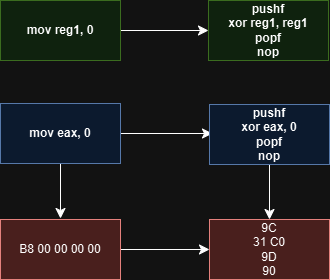
            // mov reg, 0
            if ((data[0] >= 0xB8 && data[0] <= 0xBF) && instruction.length == 5 && data[1] == 0x00 && data[2] == 0x00 && data[3] == 0x00 && data[4] == 0x00) {

                // Register opcode mapping from `mov reg, 0` to `xor reg, reg`
                const uint8_t mov_to_xor_map[8] = { 0xC0, 0xC9, 0xD2, 0xDB, 0xE4, 0xED, 0xF6, 0xFF };

                data[2] = mov_to_xor_map[data[0] - 0xB8]; // Get correct register encoding
                //printf("ANALYZE! Technic 2 -> %x, %x\n", mov_to_xor_map[data[0] - 0xB8], data[0]);

                data[0] = 0x9C; // push flags, because original mov instruction didn't affect flags
                data[1] = 0x31; // Convert to XOR
                data[3] = 0x9D; // pop flags
                data[4] = 0x90; // Fill remaining bytes with NOP
                counter++;
                goto outside;
            }
Probably you didn’t encounter with this example but it is exist. Maybe older compiler maybe it is about optimization settings but when I tested I saw it. Anyway it will make our algorithm more colorfull :)
mov instruction not effect any flags but xor will. This is why we first push flags and then we take it back, even all this process we still have one empty byte and we will fill it with nop.
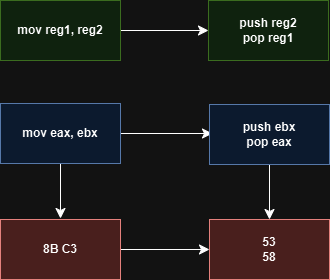
// mov reg, reg//32
if (data[0] == 0x8B && instruction.length == 2) { // mov eax, reg

    if (data[1] >= 0xC1 && data[1] <= 0xC7) {
        data[0] = data[1] - 0x70;
        data[1] = 0x58; // pop eax (same for all cases)
        //printf("ANALYZE! Technic 3 -> %x, %x\n", data[0], data[1]);
        counter++;
    }

    else if (data[1] >= 0xC8 && data[1] <= 0xCF) { // mov ecx, reg
        data[0] = data[1] - 0x78; // Convert mov to push
        data[1] = 0x59; // pop ecx
        counter++;
        //printf("Tested! Technic 3 \n");
    }
    else if (data[1] >= 0xD0 && data[1] <= 0xD7) { // mov edx, reg
        data[0] = data[1] - 0x80; // Convert mov to push
        data[1] = 0x5A; // pop edx
        counter++;
        //printf("Tested! Technic 3 \n");
    }
    else if (data[1] >= 0xD8 && data[1] <= 0xDF) { // mov ebx, reg
        data[0] = data[1] - 0x88; // Convert mov to push
        data[1] = 0x5B; // pop ebx
        counter++;
        //printf("Tested! Technic 3 \n");
    }
    else if (data[1] >= 0xE8 && data[1] <= 0xEF) { // mov ebp, reg
        data[0] = data[1] - 0x98; // Convert mov to push
        data[1] = 0x5D; // pop ebp
        counter++;
        //printf("ebp! Technic 3 \n");
    }
    else if (data[1] >= 0xF0 && data[1] <= 0xF7) { // mov esi, reg
        data[0] = data[1] - 0xA0; // Convert mov to push
        data[1] = 0x5E; // pop esi
        counter++;
        //printf("esi! Technic 3 \n");
    }
    else if (data[1] >= 0xF8 && data[1] <= 0xFF) { // mov edi, reg
        data[0] = data[1] - 0xA8; // Convert mov to push
        data[1] = 0x5F; // pop edi
        counter++;
        //printf("edi! Technic 3 \n");
    }
    // If no match, skip modification

    goto outside;
}
Here is the best one for this situation
It won’t effect stack, no changed flags, everything perfect and additionally it uses to much.
You can also add “esp”, I didn’t add because I don’t want to mess with esp.
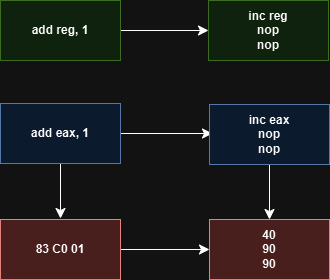
            if (data[0] == 0x83 && data[2] == 0x01 && data[1] >= 0xC0 && data[1] <= 0xC7) { // add reg, 0x01
                data[1] = data[1] - 0x80;
                data[0] = 0x90;
                data[2] = 0x90;
                counter++;
                printf("NOT TESTED\n");

                goto outside;
            }
This is also make the same process but only difference is Carry Flag. I didn’t exclude this because it never catched in my tests, if you can catch this pattern you can test it but don’t forget to tell me the result :)
Why I showed examples which are not going to be used ?
Because I tried it, so you will see it!! :)) Just kidding, these are also adds variety to your example when it is suitable.
opcodes are done now we will write it to file. Next step ->
Cooling Down
Here is just a quick reminder.
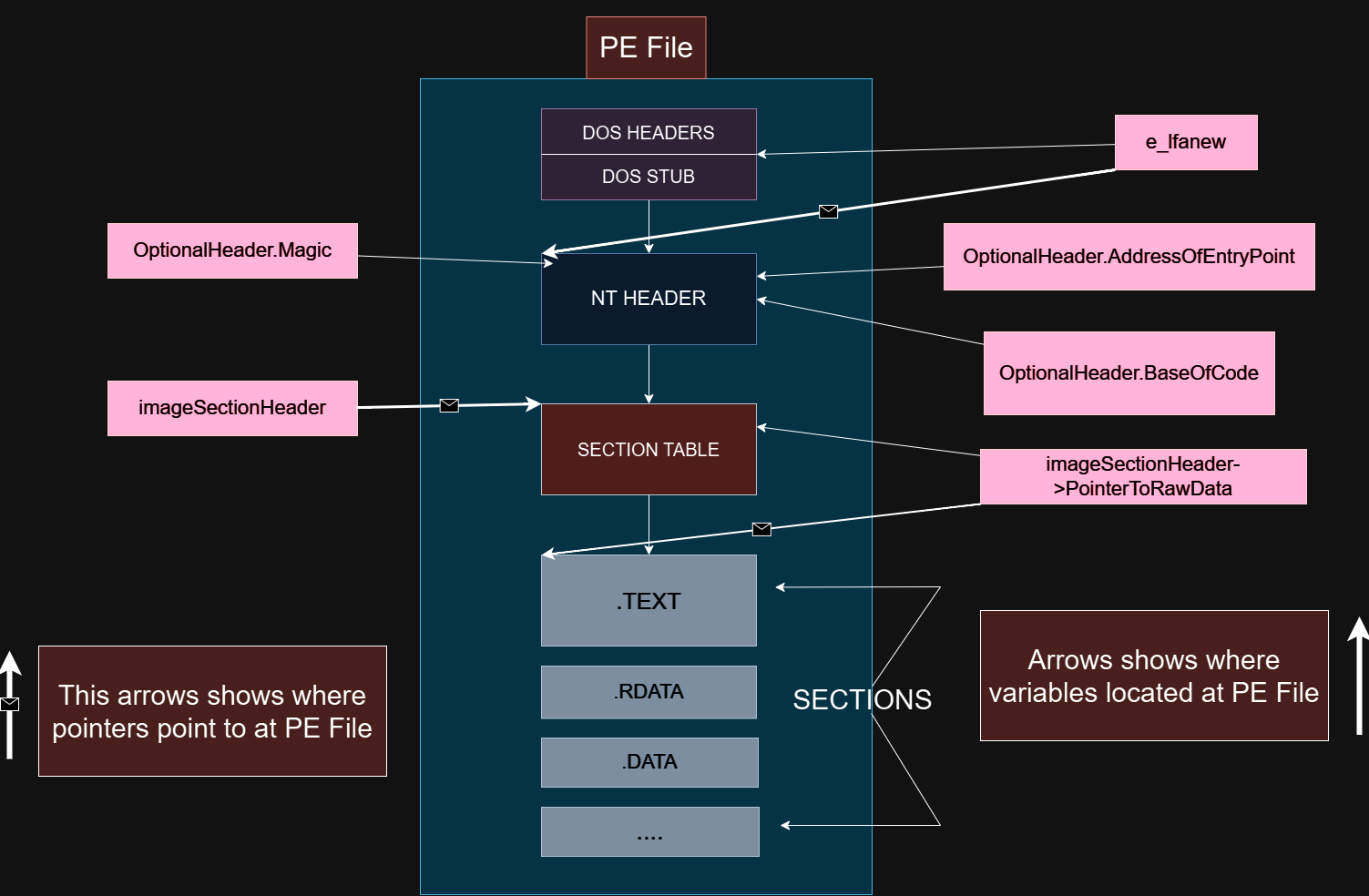
We only changed “.text” section’s few bytes. So we will put everything again in the file except “.text” section.
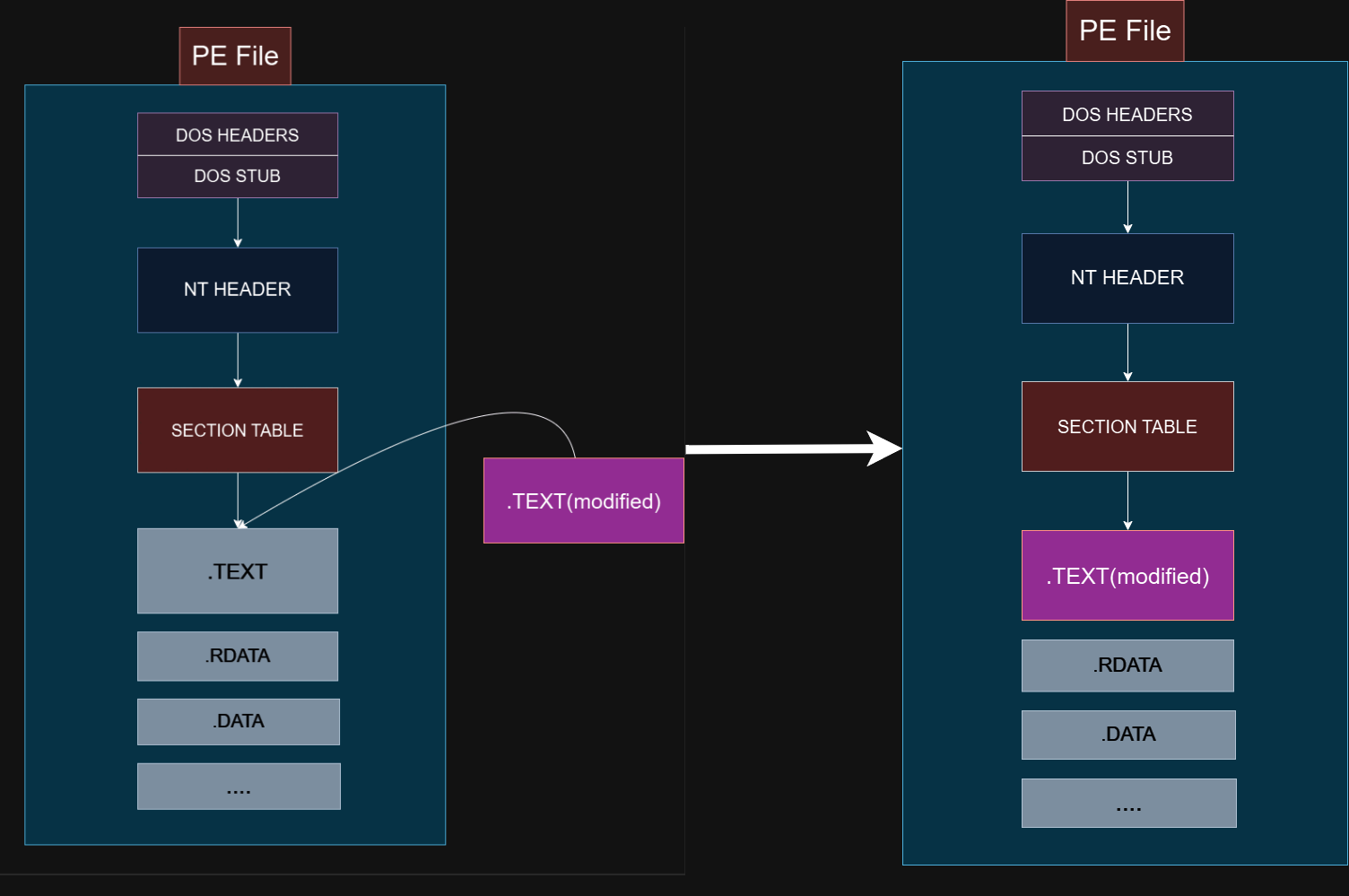
How to write file with changes -> Here it is ↓
void writeToFile(int* textModifiedBuffer,int size, char* getFileName) {

	std::string filename = (string)getFileName;
	HANDLE loadFile = CreateFileA(filename.c_str(), GENERIC_ALL, FILE_SHARE_READ, NULL, OPEN_EXISTING, FILE_ATTRIBUTE_NORMAL, NULL);

	//check handle
	if (loadFile == INVALID_HANDLE_VALUE)
	{
		printf("[!] Failed to get a handle to the file - Error Code (%d)\n", GetLastError());
		CloseHandle(loadFile);
		exit(1);
	}

	DWORD nNumberOfBytesToRead = GetFileSize(loadFile, NULL);
	LPVOID lpBuffer = HeapAlloc(GetProcessHeap(), 0, nNumberOfBytesToRead);

	DWORD lpNumberOfBytesRead = { 0 };
	if (!ReadFile(loadFile, lpBuffer, nNumberOfBytesToRead, &lpNumberOfBytesRead, NULL))
	{
		printf("[!] Failed to read the file - Error Code (%d)\n", GetLastError());
		CloseHandle(loadFile);
		exit(1);
	}


	// GAME ZONE

	int* peHeader = (int*)lpBuffer + ((int)((PIMAGE_DOS_HEADER)lpBuffer)->e_lfanew) / 4;

	PIMAGE_SECTION_HEADER imageSectionHeader = { 0 };

	imageSectionHeader = (PIMAGE_SECTION_HEADER)(peHeader + sizeof(IMAGE_NT_HEADERS32) / 4);


	DWORD textBegin = imageSectionHeader->PointerToRawData;

	unsigned char* finalArray = (unsigned char*)lpBuffer; // original file pointer
	unsigned char* bytePtr = (unsigned char*)textModifiedBuffer; // it hold changed text section

	for (int i = textBegin,j = 0; i < size + textBegin; i++,j++) { // it will start from the
		finalArray[i] = bytePtr[j]; // this will write only text section to original file
	}

	// GAME ZONE END

	char Createfilename[50] = "output.exe";
	FILE* file = fopen("output.exe", "r");
	int counter = 1;

	// if it is exist, create new one
	while (file != NULL) {
		fclose(file);
		sprintf(Createfilename, "output(%d).exe", counter++);
		file = fopen(Createfilename, "r");
	}

	file = fopen(Createfilename, "wb");
	if (file == NULL) {
		perror("File couldn't open\nProbably it is open :)");
		exit(1);
	}


	fwrite(lpBuffer, 1, lpNumberOfBytesRead, file);

	fclose(file);
	std::cout << "File saved as: " << Createfilename << std::endl;
}
We already gave it the code section to disassemble function and then we will take same variable as input for writing back. But now we will check for another condition.
I mentioned about entrypoint, it is not the same thing with code section’s beginning.
Why I used it ?
In case of not disassembled correctly. How we understand it? Easy, if our patched bytes counter is zero or very low it is not disassembled like it should be.
Yeah it may be disassembled correct and may be the counter is zero, I know but is it matter ? If it is zero, when we try it from entrypoint, it will be zero again. So, just go on
// ------

    int changedBytes = DisassembleBuffer(&decoder, &data[0], size);// execute function first time
    if (!changedBytes || size / 0x5000 * 25 < changedBytes || changedBytes < 20) {

        printf("Couldn't write anything or an error occurred:'(\nProgram will try it with entrypoint\n");

        exeInfo = PeParser(fileName);

        for (int i = 0; i < size; i++) {
            data[i] = (uint8_t)getChar[i]; // Write original file again if something written before here
        }

        int size2 = 0x1000;

        if (size - exeInfo.entryOffset > 0x10000)
            size2 = (size - exeInfo.entryOffset) % 0x10000 + 0x3000; // it will be better, just testing


        uint8_t* data2 = (uint8_t*)malloc(size2);

        data1 = exeInfo.entryPoint;

        getChar = (char*)data1;

        for (int i = 0; i < size2; i++)
            data2[i] = (uint8_t)getChar[i];

        if (!DisassembleBuffer(&decoder, &data2[0], size2)) // execute function second time
            printf("Write Failed Again!\n");

        int entryHex = (int)exeInfo.entryOffset - exeInfo.rawTextoffset;
        //printf("entryHex -> %x\n", entryHex);
        for (int i = entryHex; i < entryHex +size2; i++)
            data[i] = (uint8_t)data2[i- entryHex];


    }

    writeToFile(data,size, fileName);
It is done!
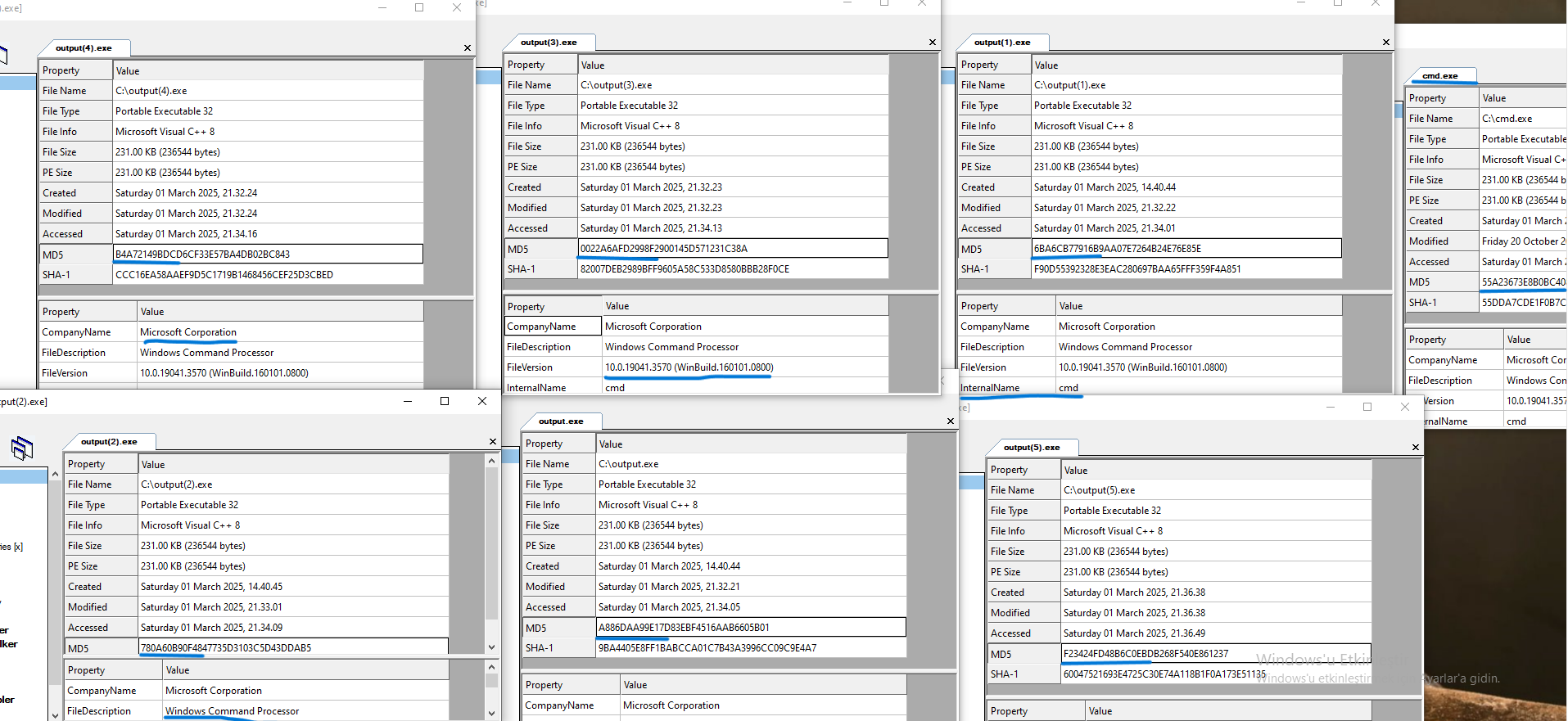
As you can see there are 6 files generated, all of them are different from the original “cmd.exe”'s hash and all of them working well. If size is huge like “cmd.exe” it will generate more different file.
Maximum different file count will be approximately n^replaceable_instructions, this is why code size is important.
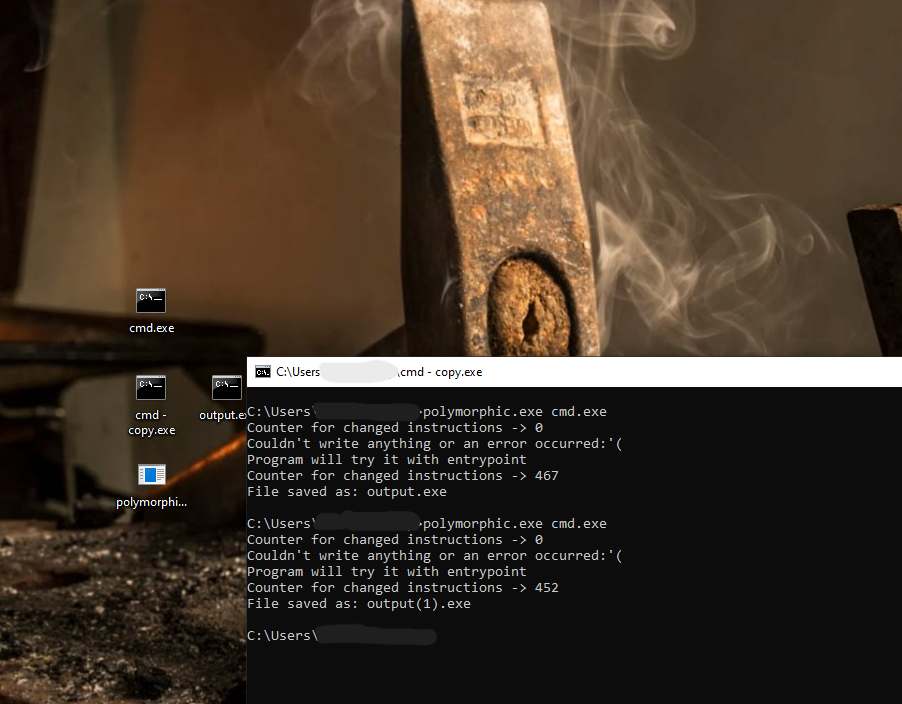
In the image above, that count is not the number of replaceable_instructions. The count of replaceable_instructions approximately double of that count. Because I changed instructions 1/2 probability.
END
I have not encounter such examples when I research Polymorphic code, so many of them make it with source code.
These examples are not enough to make perfect polymorphic code but it is good for beginning. Changing decision algorithm without broke the flow is best part but now we have not.
Full code
Here is the github link for my code and binary.
~ Existence is a Fact, Living is an Art. - Frédéric Lenoir
